Crossbeam MCP Server: Bring Your Ecosystem Into Your AI Tools

Everyone can now use Crossbeam's AI Connectors to Claude, ChatGPT, and Glean, as well as our remote MCP server. This means revenue teams can now bring partner overlaps, ecosystem signals, and account intelligence directly into the AI tools and agents their team already uses.
Every account, contact, and opportunity shared directly with you by a partner on Crossbeam creates a type of intelligence no competitor can buy, scrape, or replicate. It's verified second-party data, and it's unique to your ecosystem.
My team has spent the last several years building ways to help our users get Ecosystem Intelligence to where revenue teams already work: inside Salesforce, HubSpot, Gong, and Chrome. Now, as AI becomes core to how revenue and GTM teams operate, the release of the Crossbeam MCP server closes that same gap for AI tools.
If your team is investing in AI tooling, you're already thinking about what data to bring into your GTM stack, whether that's internal knowledge or third-party account intelligence sources. Crossbeam is the data layer that gives your AI tools real-time access to partner ecosystem data so your revenue team gets a true 360 view of every account.
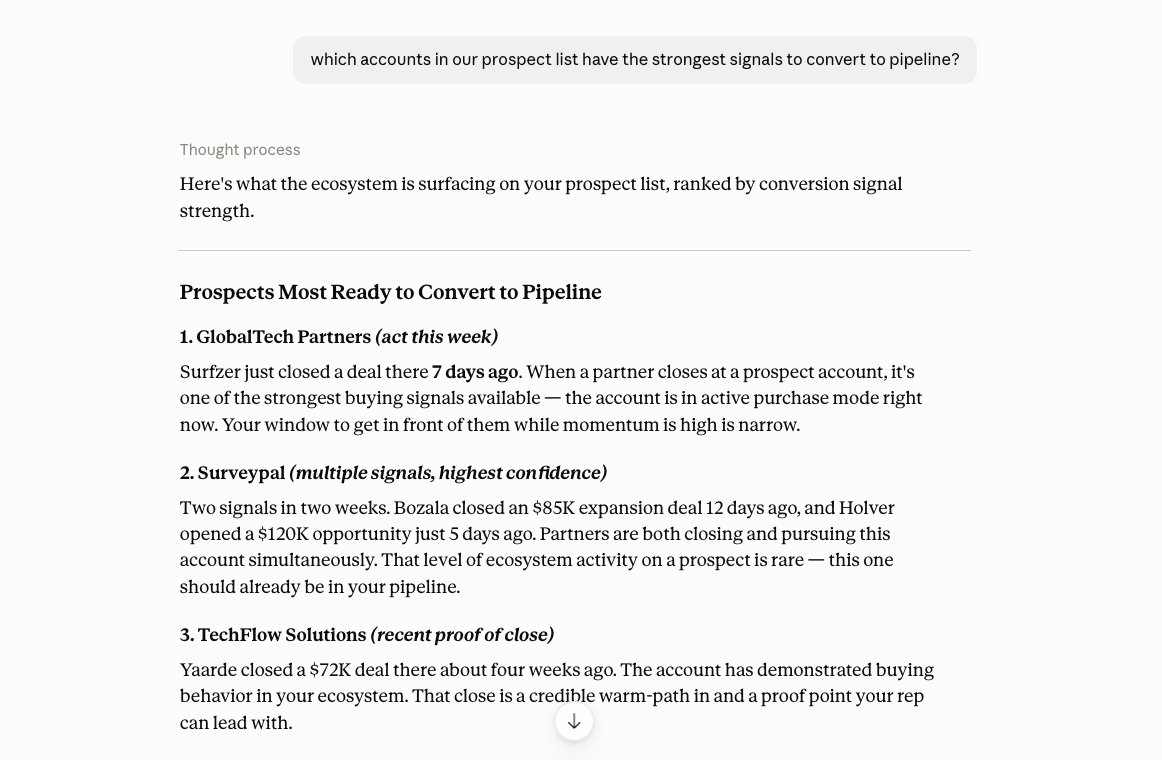
Our customers shared incredible wins already during our beta: getting ecosystem insights in front of their team faster and condensing work that used to be manual or take hours into a few prompts.
Acquia's Anna Rogert turned a week of account mapping prep into a one-minute report. Dan O'Leary wired Crossbeam into his AI stack to scale sales enablement and cut partner landing page production from 16 weeks to 16 minutes.
I'll be covering everything you need to know about getting started with Crossbeam's AI Connectors and MCP Server.
What the Crossbeam MCP Server is
Crossbeam MCP is our remote server that gives your AI tools secure, structured access to ecosystem data. Connect it once, and assistants like Claude, ChatGPT, or your own internal agents can tap into your partner overlaps, co-sell opportunities, new leads qualified by your ecosystem, and any data shared by your partners, like key contacts. Your team gets access to second-party account intelligence right where they are already working, no manual export or analysis required.
It's built on Model Context Protocol, an open standard similar to the way APIs work: a protocol that makes it possible to pass data between AI tools and SaaS applications in a structured, permissions-aware way. Crossbeam's MCP server uses it to give your AI tools permissions-aware access to the account intelligence surfaced through your partner overlaps and account mapping, so you can build lists, surface co-sell opportunities, draft joint opportunity plans, and prioritize accounts based on where your ecosystem is actively working.
Three teams get the most out of it:
- Revenue teams use it to build AI account briefs with ecosystem context, personalize outreach with partner-specific signals, and prioritize accounts with an active partner relationship or recent activity.
- Partnership teams use it for account-level lookups, co-sell prep, scaling sales enablement, and turning account mapping data into joint opportunity plans.
- RevOps and GTM Engineering teams use it to ground AI-powered GTM workflows, account enrichment agents, or scoring models in partner-shared account insights and contact data.
What you can do with Crossbeam MCP
Once connected, your AI can pull the same ecosystem intelligence you'd find inside Crossbeam: partner overlaps, co-sell opportunities, Ecosystem-Qualified Leads, and partner-shared buyer contacts. Ask for a prioritized account list, a pre-call brief, a joint opportunity plan, or a scan of which partners are active on an account, all without leaving the tool you're already in.
For the full list of what your AI can pull in from Crossbeam, see the tools reference in our documentation.
Which AI tools work with Crossbeam MCP
Claude, ChatGPT, and Glean all have native Crossbeam connectors, so you can connect in a few clicks without any technical setup. Gong's AI Agents can also surface Crossbeam ecosystem context directly inside account briefs.
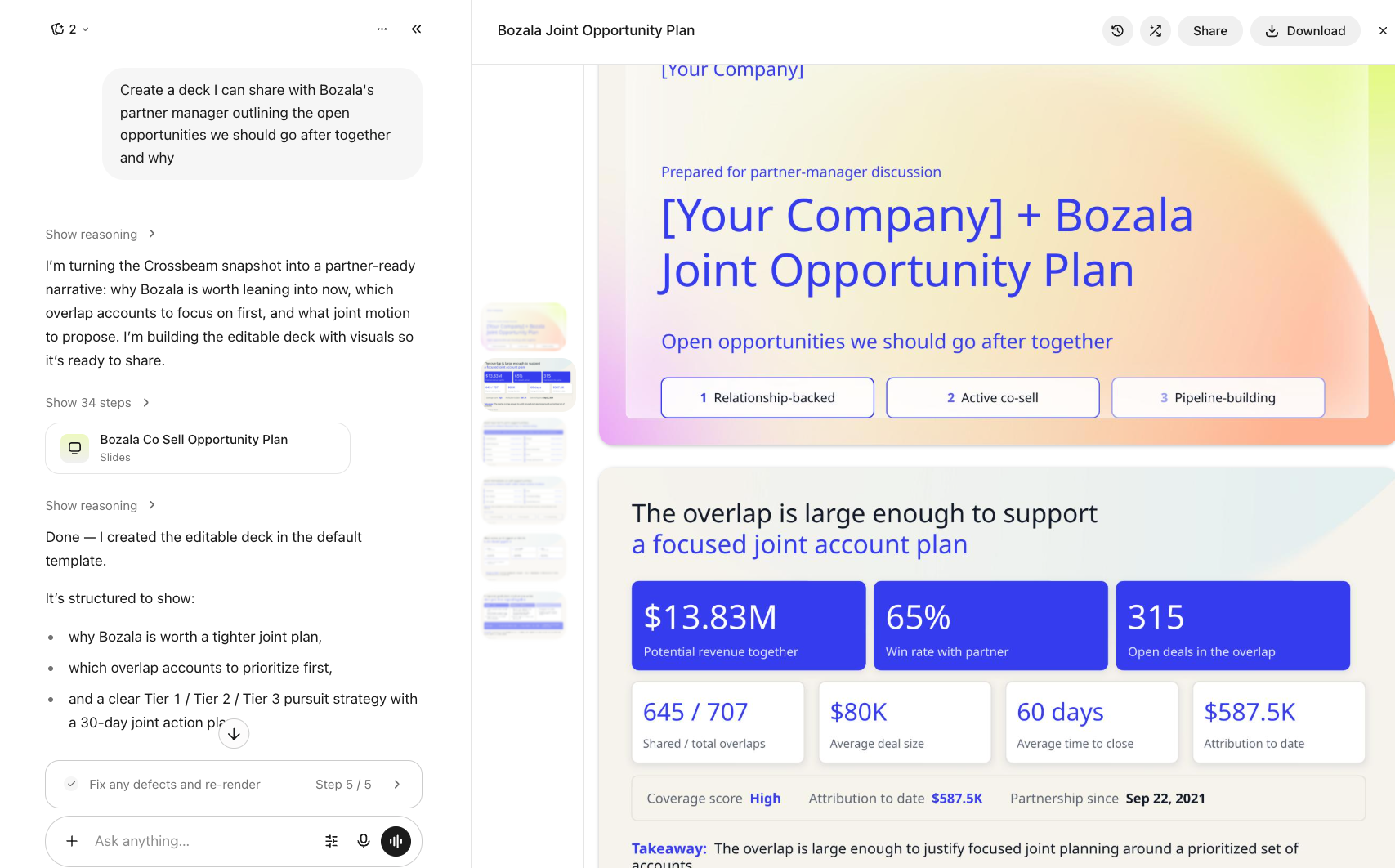
Beyond those, Crossbeam MCP works with any MCP-compatible client, meaning any AI tool or platform built to support the Model Context Protocol standard, even without a dedicated Crossbeam connector. Customers have already connected it to tools like n8n and Microsoft Copilot, and any other MCP-compatible platform can connect the same way, by pointing it at Crossbeam's remote MCP server URL.
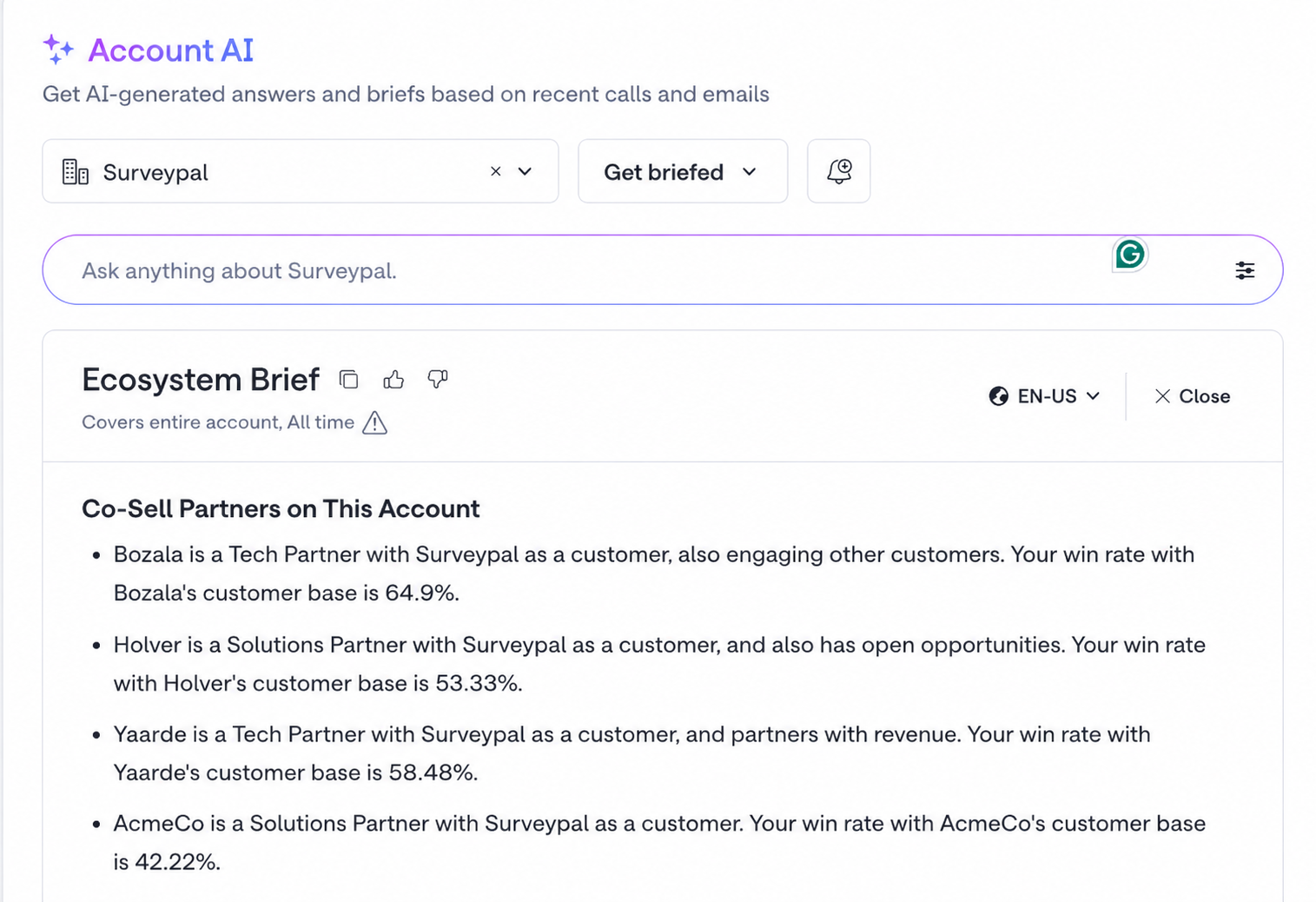
How to Connect the Crossbeam MCP Server
Crossbeam MCP is available to any Crossbeam user with a seat, on any plan, including free plans. Not on Crossbeam yet? Sign up for free.
Before you connect:
- Make sure you have at least one data source flowing into Crossbeam
- Connect at least one partner so there's ecosystem data to surface. No partner connections? Use one of our 40+ Open Data Partners for instant account mapping; no partner connection required.
To connect through Claude, ChatGPT, or Glean: find Crossbeam in the tool's connector or app directory, click to connect, and authenticate with your Crossbeam credentials. Depending on your plan, an admin may need to approve the connector first.
Find our connectors here: Claude | ChatGPT | Glean
For any other AI tool that accepts custom MCP connections, set up a custom connection using our remote server URL, https://mcp.crossbeam.com/mcp, and authenticate with your Crossbeam account.
Full setup steps will live in the documentation of the AI tool you’re connecting to, but we offer some guidance in our documentation.
To confirm it worked, start a new session and ask your assistant what Crossbeam tools it has access to. If nothing appears, disconnect and reconnect in that tool's connector settings.
What Crossbeam MCP costs
Crossbeam MCP is available on every plan at no extra cost. Usage is tracked through Crossbeam Credits, our new way of measuring how enriched ecosystem data moves from Crossbeam into AI tools and agents.
- Every plan includes an annual baseline pool of credits per account, not metered per user. You can track your team's usage in-app.
- Supernode and Enterprise plans can add credit packs to expand usage before the annual reset.
- Not every action uses the same amount of Crossbeam Credits.
- Pulling your own account info or searching Crossbeam's knowledge base and ELG best practices is always free. Everything else, like an overlap lookup on a single account or a full ecosystem-wide scan, draws from your credit balance, with more compute-intensive requests using more credits.
Want the full picture on how Crossbeam Credits work? Read the Credits FAQ.
How Crossbeam MCP Keeps Your Data Safe
Crossbeam's MCP server is functionally an API. It authenticates the caller against your existing Crossbeam permissions and returns only what that caller is already authorized to see, the same access pattern as any other integration you run against Crossbeam today.
A few points worth knowing:
- No new exposure. No data leaves Crossbeam that your team couldn't already access through the API or within the application.
- Scoped to your permissions. The MCP server only allows what a user is already permitted to do in-app.
Get Started With Crossbeam MCP
Find Crossbeam in the Claude, ChatGPT, or Glean marketplace, or connect any other MCP-compatible tool using our remote server URL. Full setup steps live in our documentation.
This works on any plan, including free. Lookup tools cost nothing, so you can test the connection before spending a credit, ask your AI tool to research an account or build a prioritized list, and see your ecosystem data show up in the answer.
Not on Crossbeam yet? Sign up for free.
Frequently Asked Questions
Do I need a developer to connect Crossbeam's MCP to my AI tools?
No developer needed for Claude, ChatGPT, and Glean; all three have native connectors you can set up in a few clicks. Depending on your plan, an admin may need to approve the connector before your team can access it. For custom MCP connections, check our documentation for how to connect on Crossbeam's side, and your AI tool's docs to understand the setup effort on theirs. Generally, MCPs only take a few clicks to set up.
What Crossbeam data can my AI pull and read as context?
Your AI tool can query partner overlaps, ecosystem signals, partner-shared contacts, partner performance metrics, and partner recommendations, all within the sharing rules you've already set up in Crossbeam. For the full list of available tools, check our documentation, or just ask your AI tool directly, since the MCP comes with built-in guidance on what it can pull.
Should I use Crossbeam's MCP, REST API, or Webhooks to get Crossbeam data into my systems?
All three have their place. Use MCP for conversational, ad hoc use cases in your AI tool, "which partners overlap with this account?" Use the REST API when you need to pull data programmatically into a system, dashboard, or scoring model on a schedule. Use webhooks (Enterprise plans) when you want data pushed to your systems the moment something happens, like a partner opening or closing a deal on a shared account.
Which AI tools can I connect Crossbeam to?
Claude, ChatGPT, and Glean have native connectors; find Crossbeam in the connector directory, app directory, or Glean app store and connect in a couple of clicks. Gong's AI Agents can also pull in Crossbeam ecosystem context directly. For any other tool, it comes down to whether it accepts custom MCP connections; if it does, our documentation has what you need to get connected.
Explore features built for

Trade in your spreadsheets and surface the most promising opportunities in your ecosystem with Crossbeam’s pipeline matching engine.

Keep pace with your partner pipeline. Monitor trends with partners and action ecosystem opportunities with a birds eye view into your revenue engine.

Stay up to date on accounts and keep things moving by sending notifications where work happens. Makes moves faster with real-time notifications in Slack and Email.

Connect your partner data anywhere. Get your ecosystem engine going with integrations that fuel your go-to-market teams and business outcomes.
ELG Insider
ServiceNow used Crossbeam and 360insights to overhaul its partner GTM, replacing fragmented portals with a unified, AI-driven ecosystem motion. Here’s what they built.
ServiceNow used Crossbeam and 360insights to overhaul its partner GTM, replacing fragmented portals with a unified, AI-driven ecosystem motion. Here’s what they built.
Here’s exactly how partner managers can turn ServiceNow’s new Build Partner Program and AI agent marketplace into a pipeline engine — with specific steps for each phase of the partner lifecycle.
Here’s exactly how partner managers can turn ServiceNow’s new Build Partner Program and AI agent marketplace into a pipeline engine — with specific steps for each phase of the partner lifecycle.

ServiceNow's redesigned Build Partner Program and simplified fee structure could dramatically lower the barrier for ISVs and technology partners building AI agents — while raising the distribution stakes in the ServiceNow Store.
ServiceNow's redesigned Build Partner Program and simplified fee structure could dramatically lower the barrier for ISVs and technology partners building AI agents — while raising the distribution stakes in the ServiceNow Store.
CrowdStrike and Fortinet announced a deep technical and go-to-market partnership in October 2024. This is what happened next — and what every technology partner can learn from it.
CrowdStrike and Fortinet announced a deep technical and go-to-market partnership in October 2024. This is what happened next — and what every technology partner can learn from it.