How Dan O’Leary Uses the Crossbeam MCP to Turn Data Into Pipeline
- Turning one-on-one briefings into notes at scale
- Running instant account research across systems
- Embedding partner data directly into a product
- Personalizing outreach before a conference with AI
- Surfacing warm paths into stalled accounts



Dan O'Leary spends a lot of his time trying to be in more places than one person can be. As a partnerships leader, he wants to sit down with every account executive and walk through their top accounts:
- who they're excited about
- what those customers are trying to solve
- which partners could help close the gap.
With sales teams spread across regions and accounts, that one-on-one time doesn't scale.
We sat down with Dan, and he walked us through how he's closed that gap across multiple roles using the Crossbeam MCP, integrating it with the tools his teams already use instead of asking them to learn something new.
"I've had a chance to build with the Crossbeam MCP, not only at my own companies, but now a lot of the folks here today at Camp Crossbeam. It's been one of the most valuable pieces of the Crossbeam solution for my team," he said.
What the Crossbeam MCP actually is
The Crossbeam MCP is a server built on the Model Context Protocol. This open standard lets AI tools like Claude, ChatGPT, Glean, Superhuman, and coding agents securely pull live data from an outside system instead of relying on a static export or a manual lookup. An MCP server acts as a translator between an AI model and a software system, giving that AI tool structured access to external data it wouldn't otherwise be able to reach.
For Crossbeam customers, that means an AI assistant can query account overlaps, partner activity, and ecosystem context on demand rather than requiring someone to open Crossbeam, run a report, and copy the results elsewhere.
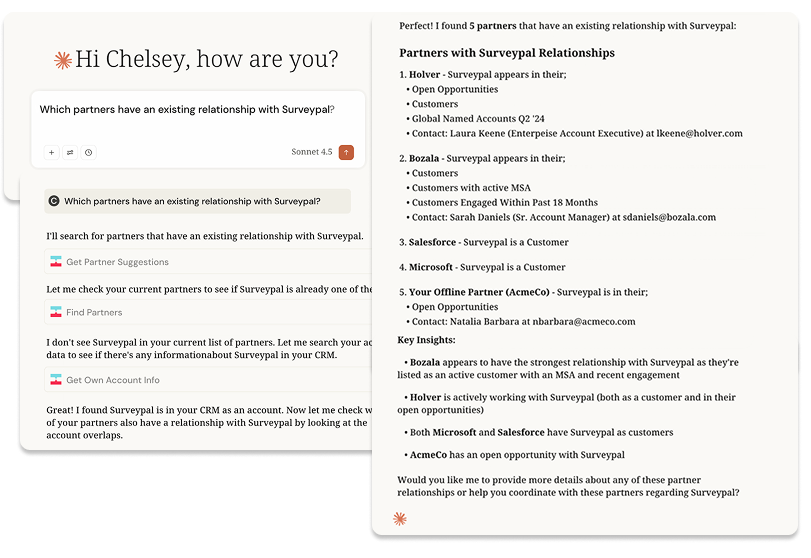
In practice, connecting it takes minutes: a rep opens their coding agent or AI tool of choice and asks it to add the Crossbeam MCP, and the agent handles the rest. "It's as easy as opening your coding agent and saying, hey, add the Crossbeam MCP. That's it. It is that simple," Dan said.
Five ways Dan put the MCP to work
Dan framed each of these use cases as an answer to the same underlying question: how do you get the context that normally lives in one partner leader's head into the hands of everyone who needs it, without asking that person to be in five places at once?
Each use case started as something he was already doing manually, in a spreadsheet, a conversation, or a one-off Slack search, before he rebuilt it around the Crossbeam MCP.
01 Personalized account "love notes" for sales reps
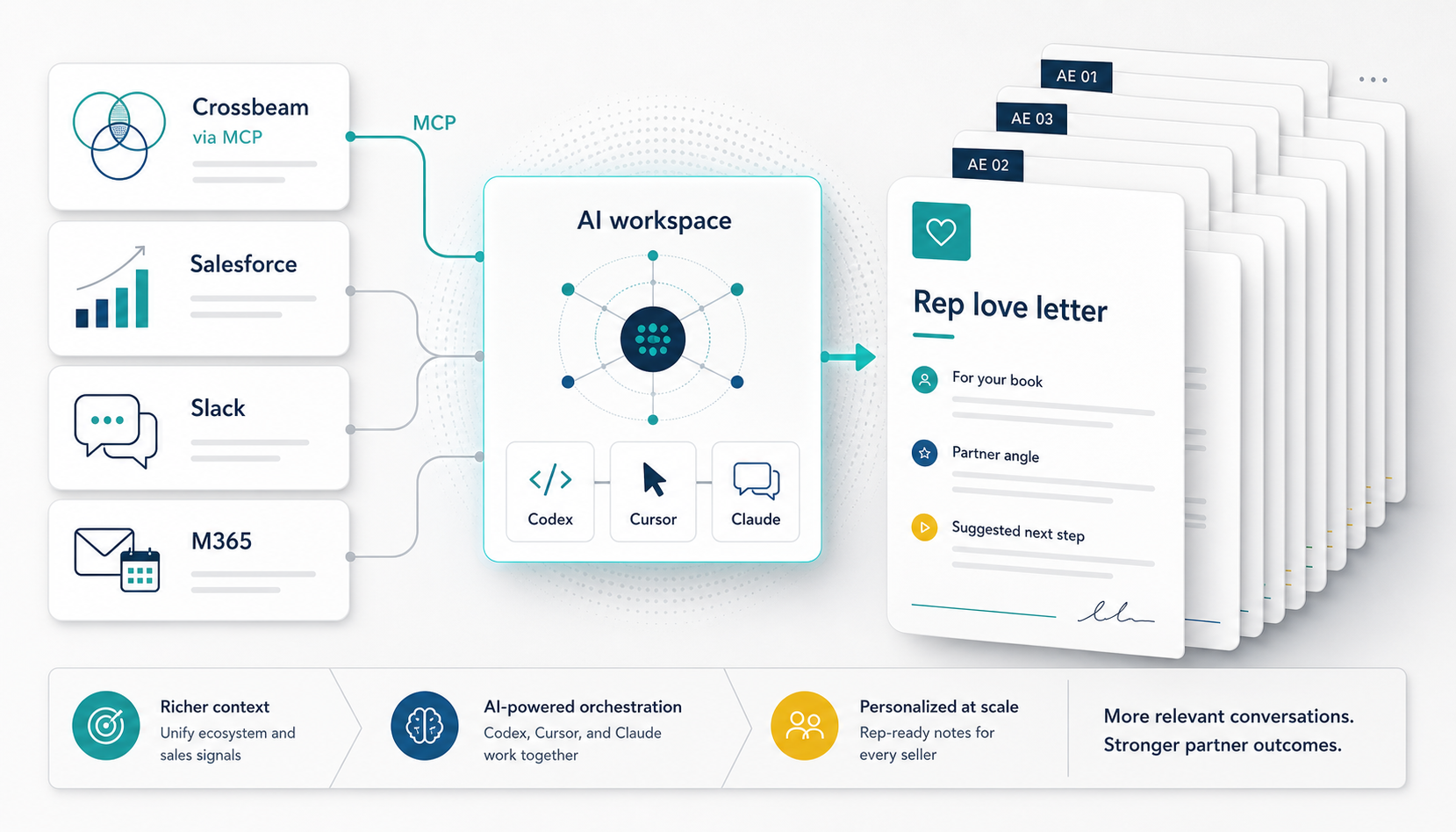
Dan's starting point was a simple habit: sitting down with an account executive and asking what accounts they were excited about, what those customers were trying to solve, and which partners could help.
He couldn't do that with every rep on a large, distributed sales team, so he used the Crossbeam MCP to turn that same conversation into something repeatable.
For each rep's top accounts, he now generates a short, personalized note laying out exactly how a specific partner could help with a specific opportunity, drawing on Crossbeam's Deal Navigator view.
The underlying data already lived across his own CRM, his partners' CRMs, and Crossbeam. What changed was his ability to pull all three together and hand a rep a finished, relevant answer instead of a raw data dump, and to do it for account planning across the full customer lifecycle, not just the initial sales conversation.
02 An always-on account research assistant
The clearest example Dan shared was that a regional account contact at one of his partners reached out in Slack asking for an account status update.
The built-in Slack shortcut for that account didn't return a useful answer, so Dan turned to his AI agent, working the same way Crossbeam Copilot does inside other tools, and gave it a single voice prompt: look into the account, check the partner's records, check Slack, check email, and check Crossbeam.
He went for a run, and the research was waiting when he got back. The agent had pulled together recent contact activity, conversations happening in Slack channels he wasn't even part of, notes from a recent meeting, and the relevant Crossbeam account context.
Instead of sending back a one-line answer, he was able to give the partner's sales leader a full picture: how long the account had been a customer, what tools they had in place, an event where the two teams had connected, and an upcoming event they could build on.
He pointed to this as the difference between giving that level of attention to a handful of people personally and being able to extend it to an entire partner organization.
03 Crossbeam data built directly into a product
Now at Lovable, which helps people turn ideas into working applications, Dan connected the Crossbeam MCP directly into that build process using the same real-time data access that powers Crossbeam's API and webhook integrations.
Any teammate building an app internally can now add Crossbeam context to the project with a single click, the same way they'd add any other integration, instead of filing a request with IT or exporting data by hand.
"I now have an MCP server that everyone in the company can connect their applications to. They don't have to go ask IT. They don't have to do some complex data export out of Crossbeam. They can just, in their project, click the plus button, choose Crossbeam, and have that integrated into their internal project. This is one of the coolest MCPs I've ever used. I love it. It's great," Dan said.
He also pointed out that the MCP isn't limited to raw account and partner data. Crossbeam has layered in supporting material, including content from Crossbeam CEO Bob Moore's book, the company's podcast, and articles from ELG Insider, so answers come back grounded not just in the numbers but in a point of view on how to work with a partner well.
04 Personalized outreach at conferences, tested carefully
Ahead of a conference he was sponsoring, Dan used Crossbeam to build a target account list of roughly fifty executives who would be attending, filling in the contacts he didn't already have through his usual process.
From there, he used his coding agent and the Crossbeam MCP to draft an individually personalized outreach note to each person, referencing details specific to them, like the weather where they were traveling from. The response rate came in around 60%.
His advice for anyone connecting the MCP for the first time was to test it with one partner and one contact, then expand to three, four, or five, rather than queuing up a batch of a few hundred messages and firing it off unchecked.
05 Reviving a stalled seven-figure target account
At a previous company, Dan's team had spent real effort trying to break into its top target account, a company already working closely with a direct competitor, and gotten nowhere.
Nobody would take a call, and the standard account mapping view in Crossbeam hadn't turned up an opening. Using the Crossbeam MCP, he brought together substantially more context in one place: the account's history, the team's past pursuits, and the wider network of relationships around it.
That surfaced a connection nobody had thought to look for, a seller at a hyperscaler partner who turned out to know the buyer personally, well enough that their kids played on the same sports team.
A call to that seller led to an on-site meeting the following week. By Dan's account, that single warm introduction turned into a deal worth roughly 50 million dollars entering the pipeline, on an account the team had otherwise written off.
Getting past the security conversation
Rolling out a persistent, agentic AI connection into customer and partner data doesn't clear a security or IT review just because it sounds useful. Dan ran into that resistance directly, and his answer wasn't to argue the concern away.
His approach was to treat it as the same conversation companies already have when they first bring on Crossbeam, just extended to cover how an agent accesses that data rather than only a person.
He'd walk stakeholders through Crossbeam's security page, how the data is stored, how it's encrypted, how users are authenticated, and how the partner relationship itself is trusted.
Once that groundwork was familiar, the newer question, how an AI agent gets onboarded the same way a new employee would, became a smaller extension of a process the team had already been through rather than a separate approval to win from scratch.
A final thought
If there's a single takeaway from Dan O'Leary's experience, it's that the Crossbeam MCP works best when it disappears into a workflow someone was already doing, rather than becoming a new tool someone has to remember to open. The account research, the personalized notes, and the warm-path introduction all came from asking better questions of data that already existed, not from a new process bolted on top of the old one.
The same caution applies in reverse: moving fast with an AI agent connected to live partner data means it's possible to move fast in the wrong direction too, whether that's a duplicated outreach message or a note sent to the wrong contact. Testing with one account, one rep, and one send before scaling up isn't a formality. It's what keeps the speed from becoming a liability.
See what the Crossbeam MCP can surface for your own accounts. Book a demo to see how ecosystem data can power the AI tools your team already uses.
Frequently asked questions
What is the Crossbeam MCP?
It's a server built on the Model Context Protocol that gives AI tools like Claude, ChatGPT, and coding agents secure, on-demand access to a company's Crossbeam data, including partner activity, account overlaps, and ecosystem context, without requiring a manual export or report.
Do I need to be technical to connect it?
No. In most AI tools and coding agents, connecting the Crossbeam MCP is as simple as asking the agent to add it and pointing it at Crossbeam's documentation. The agent handles authentication and setup from there.
What can partner and sales teams actually do with it?
Teams have used it to draft personalized account briefings for reps, pull instant account research across multiple systems, personalize outreach at scale, and surface warm-path introductions through partner network connections that would otherwise take hours to find manually.
Is connecting an AI agent to partner data a security concern?
It raises the same questions any new system touching customer and partner data would raise. Crossbeam publishes its data handling, encryption, and authentication practices, and teams have found it useful to walk security or IT reviewers through those the same way they would for any other integration.
Explore features built for

Trade in your spreadsheets and surface the most promising opportunities in your ecosystem with Crossbeam’s pipeline matching engine.

Keep pace with your partner pipeline. Monitor trends with partners and action ecosystem opportunities with a birds eye view into your revenue engine.

Stay up to date on accounts and keep things moving by sending notifications where work happens. Makes moves faster with real-time notifications in Slack and Email.

Connect your partner data anywhere. Get your ecosystem engine going with integrations that fuel your go-to-market teams and business outcomes.