How Acquia Turned a Week of Account Mapping Into a One-Minute Report with AI
- Turning account mapping into instant reports thanks to AI
- Surfacing new deal opportunities instead of only retention plays
- Converting overlap data into shareable spreadsheets
- Building repeatable AI workflows for a whole team
- Co-prospecting a shared vertical with one partner



Partner managers who are new to their book of accounts run into the same wall: they don't yet have the relationship history to know which partners already touch which customers, and mapping that out by hand, one account at a time, eats up hours that could go toward the partner conversations that actually move deals forward.
That was the challenge Anna Rogert faced when she joined Acquia's partnerships team as a Regional Partner Manager in December. She inherited a book of partner accounts she barely knew and a manual process for finding where those partners overlapped with Acquia's pipeline.
Account mapping in Crossbeam gave her the underlying data, but pulling it into a usable report still meant clicking through screens one account at a time.
What changed that wasn't Crossbeam alone. It was Crossbeam's MCP connector in Claude.
It reads Crossbeam's account mapping data and Salesforce data together and answers questions about it in plain language, instead of Anna checking each system by hand.
What started as a way to save time on one report became a repeatable way to build trust with partners, speed up deals, and support the Ecosystem-Led Growth work of Acquia's partnerships team through her first two quarters on the job.
The problem: a new hire with a big book of partners and no fast way to map them
Acquia's partner team has a handful of partner managers split across the US and Europe, each carrying their own slice of the partner book.
When Anna started, she didn't have the tenure to look at a list of open opportunities and know which partner already worked with that account. Building that picture meant going into Crossbeam one account at a time, checking overlaps, then manually assembling a report to share with the rest of the team.
The problem got harder once she needed to hand that account mapping data to a partner directly. Not every partner contact has a Crossbeam seat, and she couldn't export the data herself, so sharing an overlap list with an outside partner meant retyping it into a spreadsheet by hand.
"The layout and everything in Crossbeam is very easy to use, but with the integration with Crossbeam and being able to have it go through emails and Salesforce, all of these things make it invaluable. I don't know what we would do without it," said Anna.
How Crossbeam's MCP powered Anna's AI workflow
Crossbeam's MCP is what let Anna connect Crossbeam's account mapping data to Salesforce and query both through Claude. She built a short set of prompts that pulled from both at once, then turned the results into something a partner could act on.
Looking back on her first two quarters using it, she said: "The MCP server has been amazing. Big fan."
01. Feed Claude her book of partner accounts
She started by giving Claude a list of the partner accounts she owns and asking it to remember them as a saved population of accounts. From there, she had it cross-reference that list against open opportunities in account mapping through Crossbeam's MCP, generating a separate report for every partner with links back to the underlying data in Crossbeam.

Then Claude built the spreadsheet itself and linked each row back to the live overlap report in Crossbeam, so Anna and her team could jump straight from the summary view into the underlying account mapping data.

02. Filter for deal acceleration, not renewals
Rather than only looking for at-risk renewals, Anna asked Claude to pull opportunities tied to a partner's existing customers while excluding anything flagged as a renewal, surfacing deal opportunities the data hadn't been used for before. A colleague on another team had used a similar filter to flag renewal risk; she adapted the same idea to look for new pipeline instead.
03. Turn overlap data into a spreadsheet a partner can use
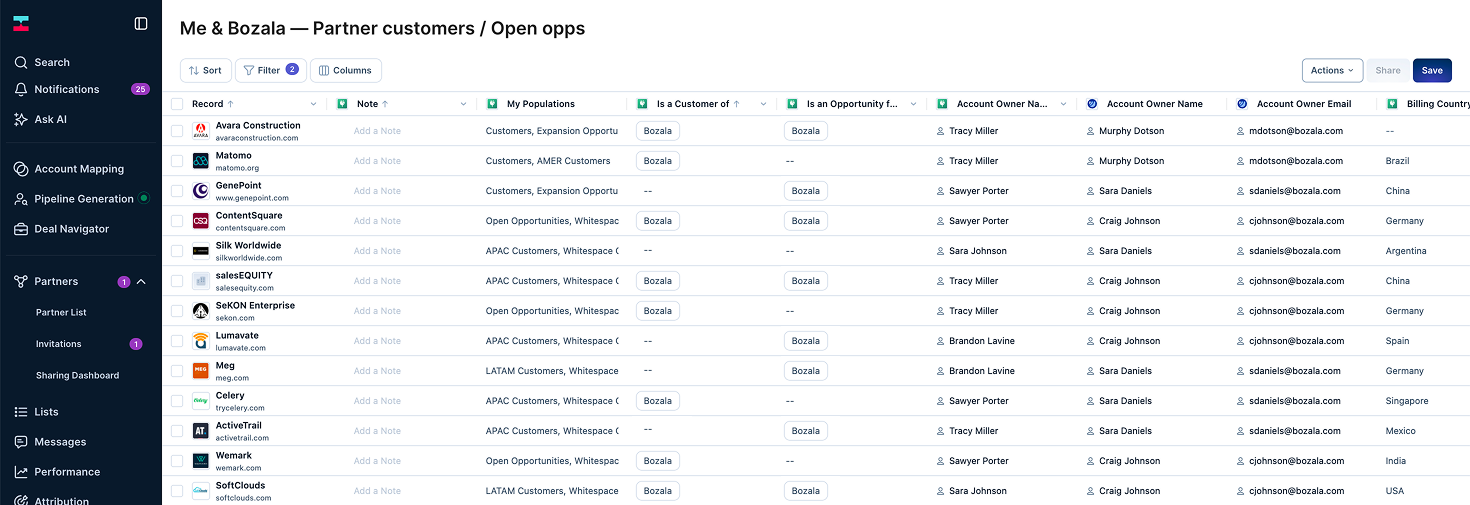
Since not every partner contact has a Crossbeam seat, Anna needed a way to hand off the data outside the platform. When she couldn't export a report directly, she took a screenshot of it and asked Claude to rebuild it as a spreadsheet.
"The first time it took six minutes. The second time it took less than a minute," she said. "It would have been me copying and pasting back and forth for hours on end. It would have been insane."
04. Save the workflow as a reusable skill for the team
Once a prompt proved useful, Anna saved it as a reusable workflow in Claude and walked the rest of her team through it over a shared screen, so a colleague could open the same overlap list without rebuilding the query from scratch.
05. Extend it into co-prospecting with a single partner
The same setup let her go a step further. For a partner she was scoping a new vertical with, Anna asked Claude to pull Acquia's prospects and her partner's prospects through Crossbeam's MCP, then filter both lists down to companies in that one vertical, an early building block for a co-selling push the two companies are now planning together.
What happened: faster trust, faster deals, and a team ahead of its number
The clearest payoff showed up in speed. A report that once took roughly a week to piece together by hand came together in about three hours, and turning a screenshot into a partner-ready spreadsheet dropped from six minutes to under a minute on repeat use.
Speed mattered because trust followed it. Ramping into a new book of partner accounts, Anna used the faster reports to bring partners into deals* she otherwise wouldn't have spotted in time.
When an existing Acquia customer put out a request for proposal, she quickly recognized that one of her partners had already worked with that account, reached out, and brought the partner into the process as well.
*None of this shows up as a product or revenue metric, but it has helped Anna's team hit quota every quarter since she joined, measured as qualified pipeline built with partners, renewals, and closed deals.
A final thought
If you're ramping into a partnerships role without years of relationship history to draw on, speed is one of the few levers you can pull right away. Connecting account mapping data to Claude so you can query it in plain language turns a week of manual cross-referencing into an afternoon, time you can reinvest in the partner conversations that actually build trust.
Anna's advice for anyone starting to combine AI with Ecosystem Intelligence comes down to two habits:
- First, save a workflow the first time it proves useful, not the third or fourth time. Rebuilding the same prompt from scratch every time it resurfaces costs more than saving it would have.
- Second, don't be afraid to experiment: you can't break the AI, and once that clicks, it opens up what it can actually do for you.
If you want to see what AI and Ecosystem Intelligence can do for your own partner team, book a call with our team.
FAQs
What is account mapping, and how did it help Acquia's Anna Rogert?
Account mapping is the process of comparing a company's customer and prospect list against a partner's list to find overlaps. In this case, account mapping gave Anna the underlying overlap data, and Crossbeam's MCP let her connect that data to Claude so she could turn it into finished reports without manually checking each account by hand.
What does Crossbeam's MCP actually do here?
It connects Crossbeam's account mapping data and Salesforce to Claude, so it can query both in plain language. Instead of Anna switching between two systems and building a report by hand, she asks a question once, and Claude pulls from both sources, building a spreadsheet and linking each row back to the live report in Crossbeam.
Why did she use Claude instead of just working directly in Crossbeam?
Anna still uses Crossbeam directly for one-off lookups. Claude, through Crossbeam's MCP, comes in for anything that takes multiple steps, like cross-referencing her whole partner book against open opportunities at once, filtering out renewals, or rebuilding a report as a spreadsheet for a partner who doesn't have a Crossbeam seat.
How did this affect deal timing?
Faster access to overlap data meant Anna could spot a partner connection while a deal was still open rather than after the fact. In one case, recognizing that a partner already worked with a customer submitting a request for proposal let her bring that partner into the process before it closed.
What does Anna tell other partner teams starting with AI and Ecosystem Intelligence?
Save a workflow the moment it proves useful a second time, rather than rebuilding it from scratch each time it comes up, and don't be afraid to experiment. As she put it, you cannot break the AI, and once you figure that out, it opens up what it can do.
Explore features built for

Trade in your spreadsheets and surface the most promising opportunities in your ecosystem with Crossbeam’s pipeline matching engine.

Keep pace with your partner pipeline. Monitor trends with partners and action ecosystem opportunities with a birds eye view into your revenue engine.

Stay up to date on accounts and keep things moving by sending notifications where work happens. Makes moves faster with real-time notifications in Slack and Email.

Connect your partner data anywhere. Get your ecosystem engine going with integrations that fuel your go-to-market teams and business outcomes.