Get an AI account brief with ecosystem context in minutes
Before any call or outreach, know which partners are already on the account, what's moving in your ecosystem around it, and what to do next — without switching tools.
Get started
Before a call, most reps pull whatever account context they can find — CRM notes, recent emails, maybe a quick LinkedIn check. What they rarely know is which partners are already working the account, whether a partner just opened or closed a deal there, or who on the partner side owns the relationship.
That partner layer changes everything. A partner with an open opportunity on the same account is a co-sell signal. A partner who just closed won there is a mutual customer worth aligning on. A greenfield signal from your ecosystem means a net new intro is possible through a partner relationship you already have. None of that shows up in your CRM or your call history — it lives in Crossbeam.
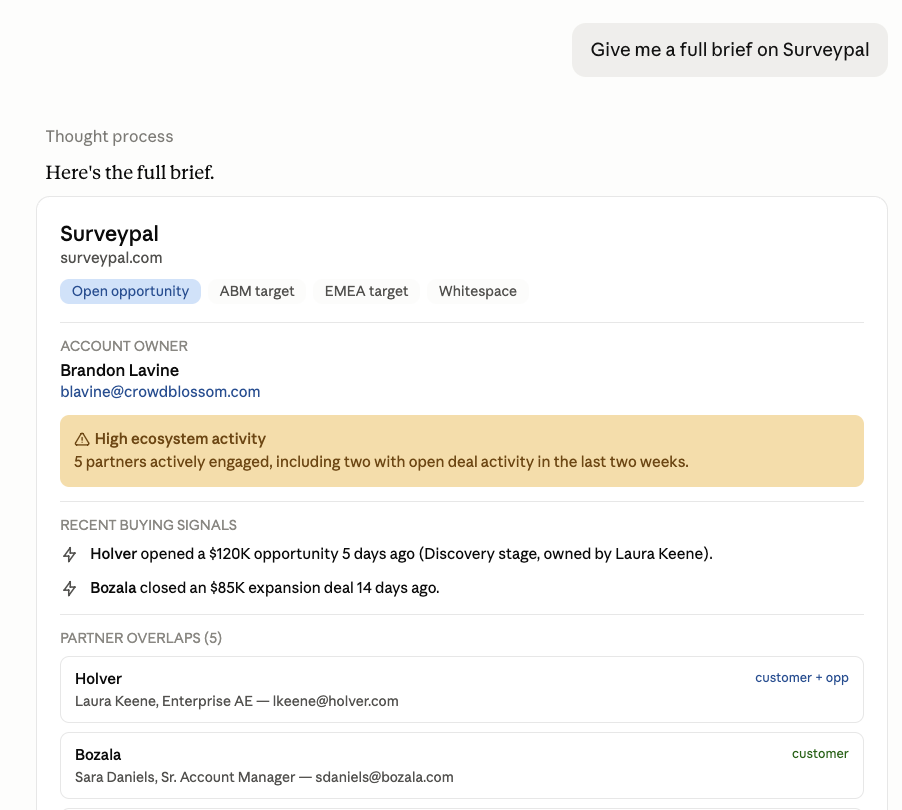
This play uses the Ecosystem-Informed Account Brief skill to combine your existing account intelligence with Crossbeam's ecosystem data into a single structured brief. So instead of going into a call with only what you know, you go in with what your partners know too.
How it works:
- Download and install the Ecosystem-Informed Account Brief skill in Claude or any other AI tool that supports skills
- Set up the skill with your desired inputs and outputs (pro-tip: upload the skill into a Claude chat and ask for help)
- Connect Crossbeam and any other sources your team uses for account intelligence to your AI tool
- Ask for a brief on any account — the skill pulls everything and structures it for you
- Optionally, share the skill with your team so everyone has the same brief quality before every call
What you need
- Crossbeam (Supernode or Enterprise plan)
- Your AI tool of choice
- Crossbeam has native connectors in Claude, ChatGPT, and Glean
- For connecting to other AI tools and agents, follow these steps
Who this is for
Sales reps, account executives, and partnership managers who want partner context built into their pre-call prep without having to do it manually. One person on your team can set this up and share it so everyone benefits.
What you'll get
- A structured account brief that surfaces Crossbeam's ecosystem data explicitly alongside your CRM and account intelligence — not buried, called out
- For each account: which partners overlap, what population they're in, who owns the relationship on their side, and what's recently moved in your ecosystem around this account
- A recommended next step based on the strongest signal — co-sell play, partner intro request, mutual customer alignment, or greenfield outreach through a partner
Steps
1. Download and install the skill
Download the Ecosystem-Informed Account Brief skill and add it to your Claude instance. The skill tells Claude how to run the full brief workflow — which Crossbeam tools to call, how to structure the output, and how to surface ecosystem signals explicitly so they don't get buried.
Download the Ecosystem-Informed Account Brief skill
Once downloaded, add the skill file to your Claude project. If you're not sure how to install a skill, follow these instructions.
2. Configure your sources
Open the skill file and fill in the Configuration section before your first run. Two things to set:
Configured sources — list the tools you want included in every brief. Start with what you have connected.
Tip: If you're unsure what's available, ask Claude to read the skill and walk you through how to set it up.
3. Run your first brief
Ask Claude to use the skill when you ask for a brief on any account. The skill handles the rest — resolving the account, pulling your configured sources, calling Crossbeam for ecosystem data, and structuring the output.
"Brief me on [Account]"
"Give me an overview of [Account]"
"What do we know about [Account]?"
If no ecosystem relationships are found, it says so clearly rather than leaving the section empty.
4. Review and act on the ecosystem signals
The brief surfaces recommended next steps based on the strongest signal available. Where a partner play is identified, the brief tells you which partner to loop in and why — and flags that partner contact details are available so you can coordinate through your partnerships lead before reaching out directly.
5. Share the skill with your team
Once your configuration is set, share the skill file with anyone on your team who preps for calls or manages accounts. They install it in their own Claude project and run it the same way — same output structure, same ecosystem layer, every time.
Already have an account brief set up? Add the Crossbeam layer
If your team already uses an account brief skill, prompt, or workflow in Claude or another AI tool, you don't need to replace it. Copy the section below and paste it into your existing skill or system prompt. It tells your AI tool to call Crossbeam for ecosystem data and surface it explicitly in the brief output.
Edit this prompt and copy and paste this into your existing account brief skill or system prompt:
## Ecosystem brief — pull via Crossbeam MCP
Run all three calls for every brief. If the account isn't found in Crossbeam, note it and continue.
Resolve the account
*Finds the account in Crossbeam and returns the internal record ID needed for the overlap call.*
Crossbeam:get_account_context(account_domain: "example.com")
Extract the record_id.
Get partner overlap
*Identifies which of your partners have this account in their data and what population they have them in — customer, open opportunity, or prospect.*
Crossbeam:find_overlap_partners(account_id: "<record_id>")
For each match capture: partner name, population name, and partner owner name if available. Do not surface partner owner contact details (email, phone) in the brief.
Get ecosystem activity signals
*Surfaces recent partner deal activity on this account — deals opened, deals closed won, and greenfield signals for companies not yet in your CRM. Use this to flag momentum, co-sell opportunities, or risk.*
Crossbeam:get_ecosystem_activity(account_domain: "example.com")
Capture: event type (deal opened / deal closed won / greenfield), partner name, date, contact context if available.
Flag and surface these signals explicitly in the brief:
Partner with an open opportunity that overlaps with your open opportunities = co-sell signal
Partner with a customer that overlaps with my open opportunities = Ask for an intro or mention integration
Greenfield signal = net new intro opportunity via partner
Add an ECOSYSTEM RELATIONSHIPS section to the brief output:
What Crossbeam shows: [partner name — population]
Recent ecosystem activity: [date — partner — event type]
Why it matters: [call out what the signal means and what to do about it]
Recommended ecosystem play: [which partner to loop in and why]
If no overlap: "No ecosystem relationships identified in Crossbeam."
If no activity: "No recent ecosystem activity."
