Add an ecosystem overview to your Gong AI Account Brief
Connect Crossbeam MCP to Gong so every account brief automatically includes whether a partner can help accelerate the deal.
Get started
Before a call, your reps are already pulling account briefs in Gong — call history, deal context, customer overview. But none of that tells them whether a partner is already working the account, has recently won a deal there, or has shared contacts and insights that could change the conversation and accelerate the close.
This play connects Crossbeam to Gong as an MCP server so partner overlap data surfaces directly inside Gong's AI-generated account briefs. So instead of switching between Crossbeam and Gong before every call, your reps see which partners can help — and how — in the same place they're already doing call prep.
How it works:
- Your Gong admin connects Crossbeam as an MCP server in Gong
- Duplicate the default Account Brief and add an Ecosystem Overview section powered by the Crossbeam MCP
- Publish the customized brief to your team
- Reps generate the brief for any account and get partner overlap data alongside call and deal history
What you need
- Crossbeam (Supernode or Enterprise plan) — each rep will need a Crossbeam sales seat to authorize their own account
- Gong with Account AI and Agent Studio enabled (any Gong plan)
- Gong tech admin access to configure MCP connections and AI Briefer
Who this is for
Sales reps and account executives who want partner context built into their pre-call prep without leaving Gong. Gong and RevOps admins who set up the brief once so the whole team benefits automatically.
What you'll get
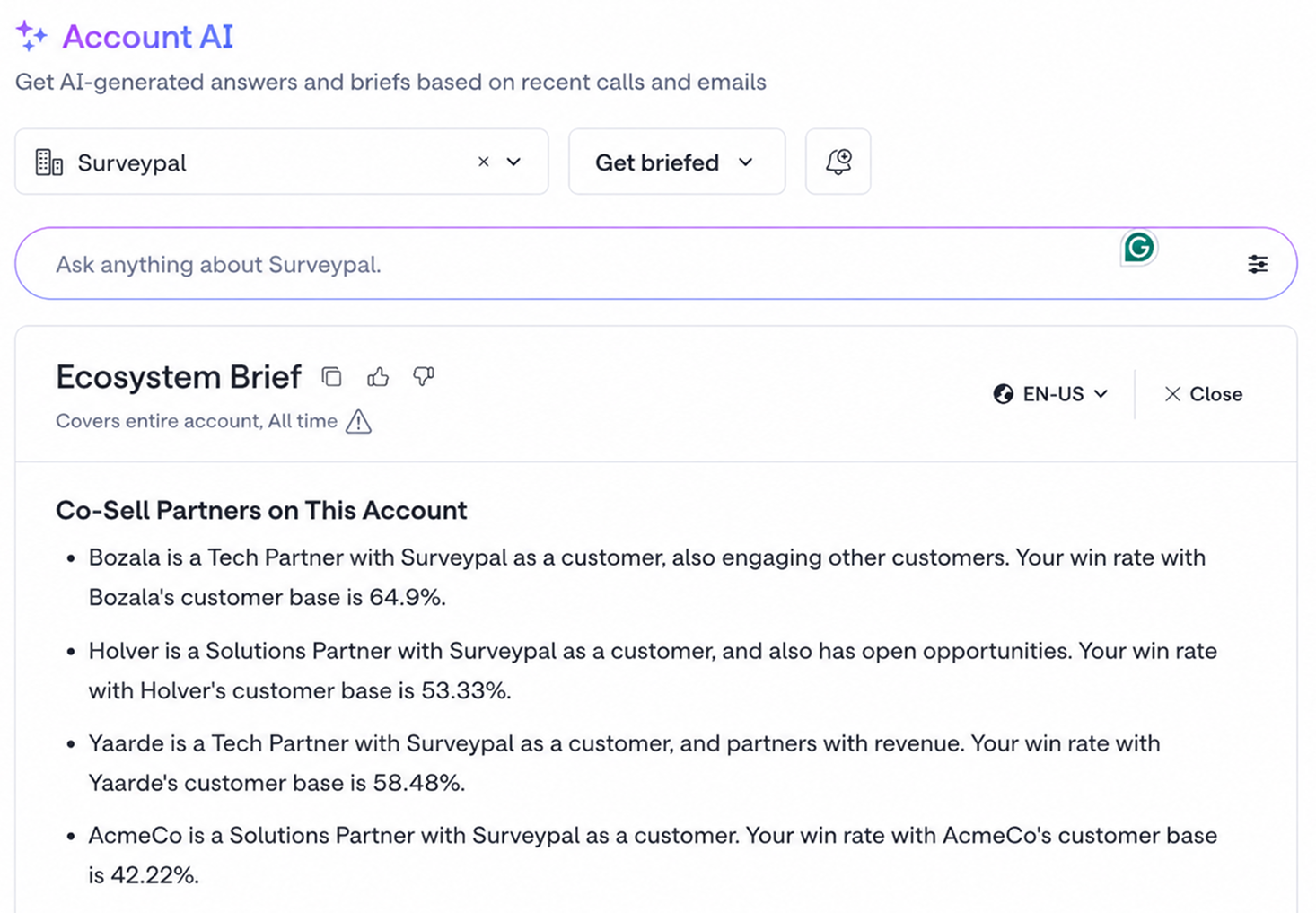
- An Ecosystem Overview section inside every Gong account brief showing which co-sell partners have the account as a customer or in their open pipeline
- Second-party data layered in with your Gong account history — know whether a partner has a relationship or recent deal activity that can change the conversation and accelerate a deal
- Optionally, a standalone Ecosystem Brief for accounts where partner context is the primary focus
Steps
1. Connect Crossbeam as an MCP server in Gong
A Gong admin will have to follow the setup instructions Gong's docs, and set up Crossbeam as an MCP connection using the Crossbeam MCP server URL: https://mcp.crossbeam.com/
This will enable you to pull in live data from Crossbeam into Gong’s AI Account Briefer and other AI features.
2. Duplicate the default Account Brief and add an Ecosystem Overview section
Once Crossbeam is connected as an MCP, you can add it to an account brief.
Gong's default Account Brief template can't be edited directly. In Admin Center, go to Agent Studio and open AI Briefer. Find the Account Brief, duplicate it, and rename it — for example, "Account Brief with Ecosystem Overview."
Inside the duplicated brief, click Add section and select MCP connection as the section type. Name the section "Ecosystem Overview" and select Crossbeam MCP from the dropdown.
Then write your MCP prompt based on what you want Gong “ask” or request from Crossbeam each time the brief is generated for an account and the structure you would like it returned in.
Here's a template prompt you can adapt:
Does {{customer_company_name}} have a relationship with any of our co-sell or tech partners, and has there been any recent deal activity between them? Use get_account_context, find_overlap_partners, and get_ecosystem_activity to check.

Output one line per partner:

[Partner Name] · [Tech Partner or Solutions Partner] · [has {{customer_company_name}} as a customer / has {{customer_company_name}} as an open opportunity / recently opened or closed a deal with {{customer_company_name}}]

Include a date or how long ago only if Crossbeam explicitly returns one. Do not include partner IDs or UUIDs.

After each line, add a recommended action if one of these conditions is met:
- Co-sell partner has this account as a customer: "Ask [Partner Name] for a reference or warm intro on [Account]."
- Co-sell partner has this account in open pipeline: "Coordinate with [Partner Name] on deal timing for [Account]."
- get_ecosystem_activity returned a "deal closed won" event for a partner: "Follow up with [Partner Name] on their recent win with [Account]."
- get_ecosystem_activity returned a "greenfield signal" for a partner: "Loop in [Partner Name] — they have activity on [Account] we don't have in our own pipeline."

If no partner relationship or activity is found at all, write "No recent partner deal activity on this account."
If a relationship or activity is found but none of the conditions above apply, don't give a recommendation.
If no partners are found for a section, write: None identified.
Save and publish the brief to your team.
4. Generate the brief
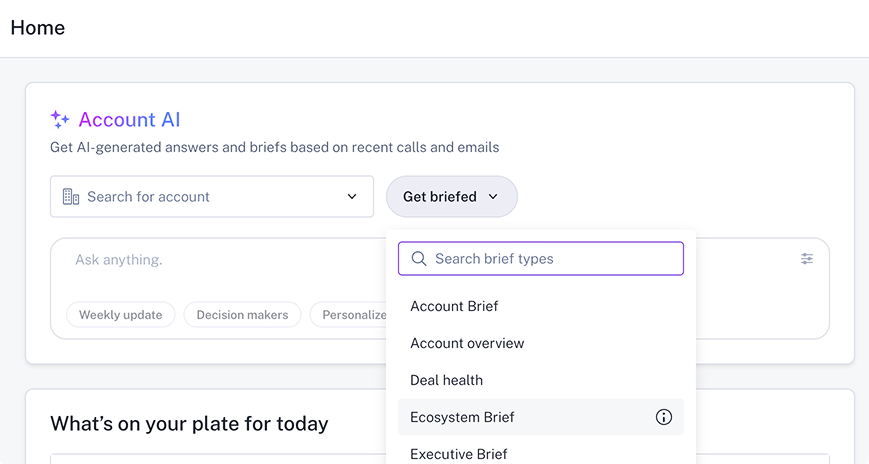
In Gong, open any account and select Account AI. Click Get briefed and get a full Account Brief with Ecosystem Overview or choose the standalone Ecosystem Brief. Gong generates the brief and will return data from Crossbeam if there’s ecosystem context available.
5. Use the partner context in your call prep
Use the Ecosystem Overview to identify which partners are already on the account and what the right play is. A partner who has the account as a customer is a warm path — request intel, ask for a backchannel reference, or coordinate a joint motion. A partner with an open opportunity means you're both working the same account — align before you go in separately.