Build a shareable joint opportunity plan in a few prompts
Use AI to pull your shared overlap from Crossbeam, filter to the accounts worth going after together, and generate a partner-ready plan your team can act on.
Get started
Partner QBRs, co-sell kickoffs, and joint campaign planning happen all the time. But the work of pulling the data, deciding which accounts to prioritize together, and putting together something shareable usually takes days. This play uses AI to collapse that analysis and process into a few prompts.
The result: a joint opportunity plan grounded in real second-party data — which accounts you're both pursuing, where the strongest co-sell plays are, and what to go after first. Co-sold deals close 40% faster, generate 44% more pipeline, and come in at 50% larger deal size. The data is already in Crossbeam. This play gets it into a plan you and your partners can act on.
How it works:
- Decide whether you're planning around joint prospects, joint opportunities, or both
- Pull and analyze your shared overlap from Crossbeam in your AI tool, filtered to the accounts that match that motion
- Rank accounts by joint opportunity strength
- Generate a shareable deck, one-pagers, or a structured plan your partner can act on
What you need
- Crossbeam (Supernode or Enterprise plan)
- Your AI tool of choice
- Crossbeam has native connectors in Claude, ChatGPT, and Glean
- For connecting to other AI tools and agents, follow these steps
- (Optional) Any partner strategy documents or joint-messaging frameworks relevant.
- (Optional) A connected source like Apollo or ZoomInfo for firmographic filtering of accounts you pull in from Crossbeam by revenue, headcount, or vertical
Who this is for
Partnerships managers preparing for a partner QBR, co-sell planning session, or joint campaign. Anyone who wants to shorten the time from account mapping insights to GTM action with a partner.
What you'll get
- A prioritized list of accounts you and your partner should pursue together, ranked by joint opportunity strength
- For each account: why it's worth pursuing jointly, which of you is further along, and a recommended coordinated first move
- A shareable artifact — deck outline, one-pager, or structured plan — ready to send to your partner or present in a planning meeting
Steps
1. Decide what motion you're planning around
Before pulling any data, align on which accounts you're targeting and why — this determines what you pull from Crossbeam and what the plan asks your partner to do. Here’s an example of two distinct motions:
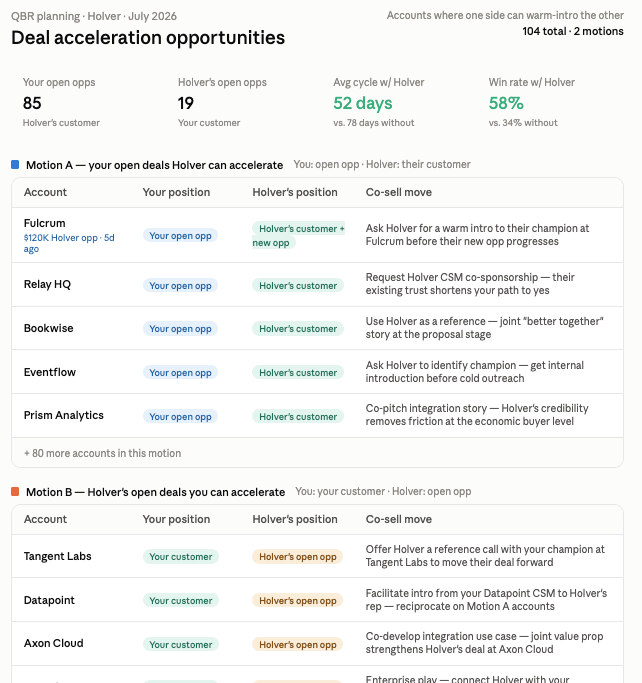
Joint prospects — accounts neither of you has won yet where you're both actively pursuing them. The value of coordinating is going in with a unified "better together" story rather than two separate pitches. This is the right motion for QBRs focused on new pipeline generation.
Joint opportunities — accounts where one of you has an open deal, and the other has a customer relationship or active presence. This is a deal acceleration motion — coordinate to close faster and win more. This is the right motion for QBRs focused on win rate and days-to-close.
Most QBRs benefit from covering both. If that's the case, run the steps below for each motion and combine the outputs into a two-section plan.
"We're planning with [Partner]. Our primary goal is [new pipeline / deal acceleration / both]. Pull our mutual overlap from Crossbeam. For new pipeline: return accounts where we're both pursuing them as prospects. For deal acceleration: return accounts where one of us has an open opportunity and the other has a customer relationship or active presence."
Optional: feed in context before you run the next steps
The more context you give the AI upfront, the more specific the plan it produces. Two things worth adding if you have them:
Joint messaging or use case doc — if you and your partner have already aligned on a "better together" narrative, a joint value prop, or a use case one-pager, paste it in before running Step 2. The AI will use it to shape the account rationale and any outreach language so it reflects the story you've actually agreed on.
Your partner's ICP — if you know which firmographic criteria, verticals, or segments your partner prioritizes, add those alongside your own ICP in Step 2. The AI can then cross-reference both when filtering — surfacing accounts that are a strong fit for both sides, not just yours.
"Before we filter, here's some additional context: [paste joint messaging doc or ICP criteria]. Use this when assessing which accounts are the best fit for a joint play."
2. (Optional) Use 1st-party and third-party data to filter the accounts further
Narrow the list using criteria that match your joint ICP — vertical, revenue threshold, geography, or deal stage. If you have Apollo or ZoomInfo connected, ask the AI to layer in firmographic data to confirm which accounts fit.
"From that list, filter to accounts in [vertical] with annual revenue over [threshold]. Exclude any current customers of both companies. If you have access to firmographic data, use it to confirm fit."
3. Generate the joint opportunity plan
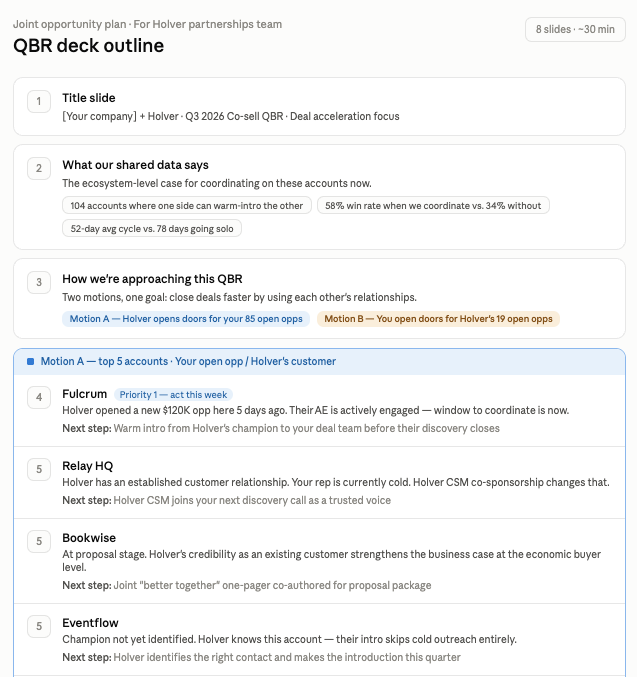
Ask the AI to turn the ranked list into a shareable artifact. Be specific about the output and format — a deck outline, a structured one-pager, or a table your partner can scan. The AI generates a draft you can refine, instead of building from scratch.
"Take the top 10 accounts and build a joint opportunity plan I can share with [Partner]'s partnerships team. Structure it as: an overview of our shared overlap and what it means, the top accounts we should go after together and why, and a recommended next step for each. Use the joint messaging context I provided earlier to frame the 'better together' rationale. Format it as a deck outline I can drop into slides."
4. Refine and share
Review the output, adjust any account reasoning that doesn't match what you know, and drop it into your preferred format — slides, a Notion doc, or a PDF. Send it to your partner ahead of the meeting or use it as the agenda for the QBR itself.
One guardrail: if Crossbeam returns no overlap data for a partner, that means the partner isn't sharing that data — not that there's no overlap. Flag it with your partner before concluding there's nothing to work with.
Make it repeatable
Option A: Set up a shared team project
After getting the output you want from your first run, ask your AI tool to generate reusable project instructions based on exactly what you did — the connectors you used, the filtering criteria, the ranking logic, and the output format. Then paste those instructions into a shared project so you or anyone on your team can run the same workflow without starting from scratch.
"Based on what we just ran, write project instructions I can reuse. Include the connectors we used, the ICP and partner criteria, the ranking logic, and the output format."
Both Claude and ChatGPT support shared projects where you can store these instructions alongside your connected data sources so the context is always there when you need it.
Option B: Turn this into a reusable skill
Skills are saved, shareable instruction sets that can be loaded into any project or chat and shared across your team — or even across AI tools. Unlike a project, a skill is a portable file you can distribute, version, and reuse anywhere that supports custom instructions.
Once you have your reusable instructions from Option A, ask your AI tool to package them as a skill:
"Take these project instructions and package them as a skill file."
From there, install it in Claude or ChatGPT and share it with anyone who runs partner planning:
Note: Skills work in any AI tool that supports custom instruction sets or system prompts, so the same file can be adapted beyond Claude and ChatGPT.