How Netskope gives sellers partner help on their top 20 accounts in five minutes or less
- Seller pipeline generation
- Token-conscious skill design
- Partner prioritization with tags
- Third-party data enrichment
- Self-serve channel mapping



Netskope is a cybersecurity company focused on AI and zero trust security, with more than 280 technology integration partners in its ecosystem. Kristen Kelly, Senior Director of Global Technology Alliances, leads joint go-to-market work with a select group of those partners, including a small set of bidirectional referral partners.
Netskope has used Crossbeam for more than three years. Earlier this year, the team joined the Crossbeam MCP beta program and paired it with Claude Enterprise.
Kristen then built two Claude skills on top of it. The first shows sellers which partners can help on their top target accounts. The second handles partner account mapping requests for the channel team.
Today, a seller can access a partner-prioritized view of their top accounts in five minutes or less.
The problem: partner data spread across too many places
Crossbeam started as Kristen's side project when she joined Netskope four years ago. The company was on a free account that wasn't yet connected to Salesforce. She built the business case and rolled it out to the global sales team with a crawl, walk, run approach. "My team immediately saw the value," Kristen says. "It took a little bit of convincing and a little bit of extra work to get cross-functional executive leadership support."
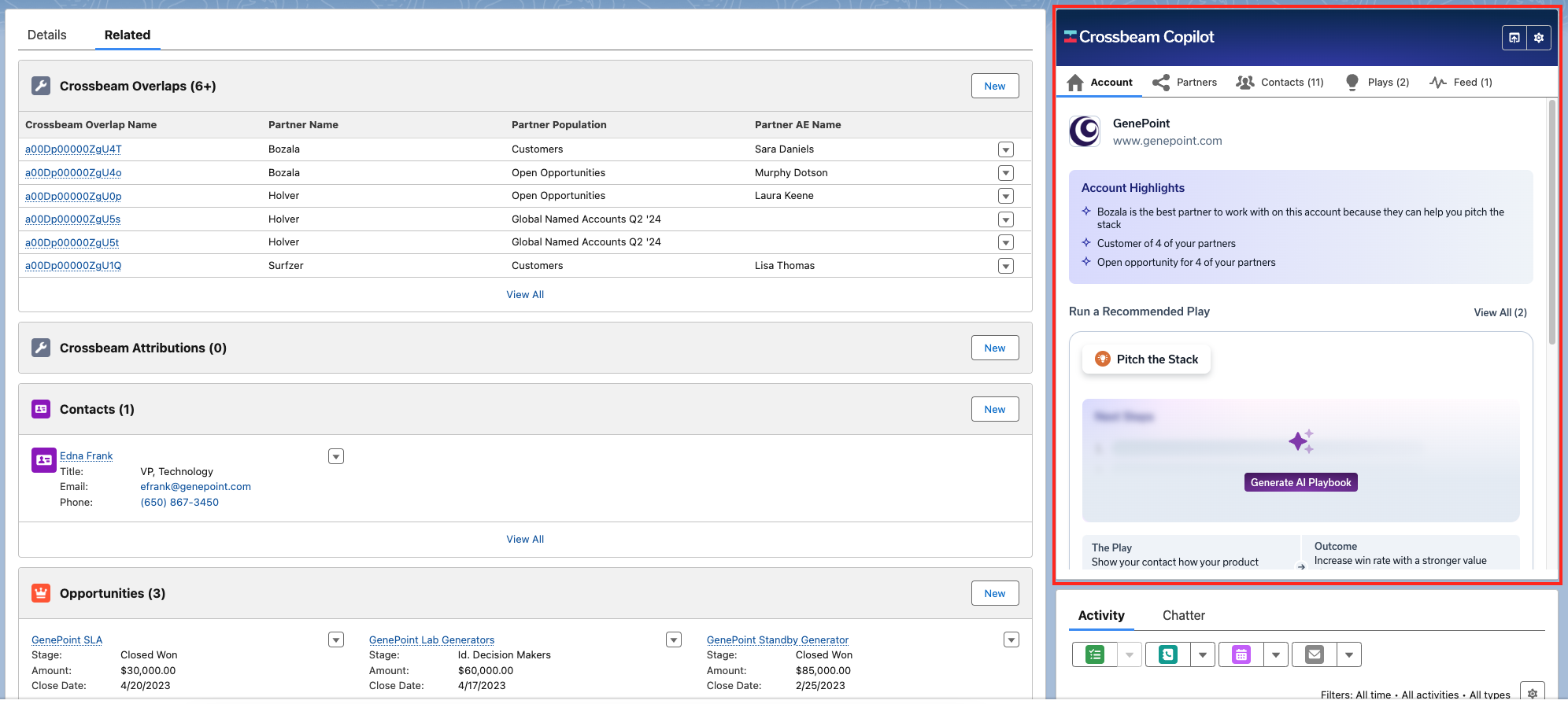
Over time, the team gave reps many ways to reach partner data. They embedded Crossbeam Copilot for Salesforce on account and opportunity pages, added a Crossbeam 360 dashboard inside Salesforce, and set up report templates for regional sales directors and account owners. Some reps preferred logging in to Crossbeam directly to use Deal Navigator.
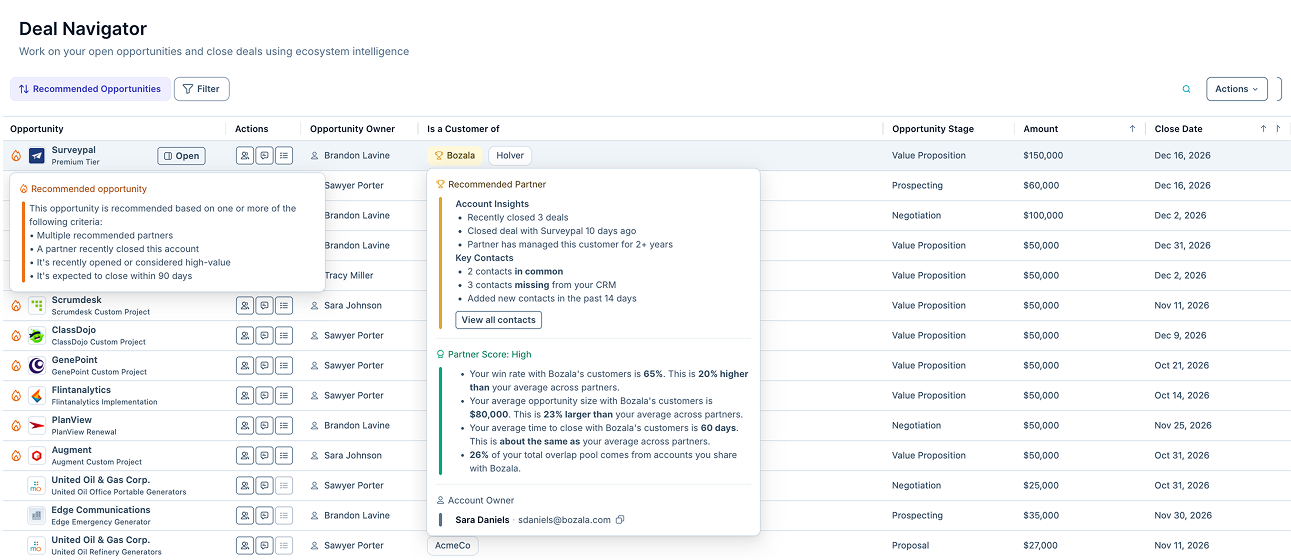
With too many entry points, reps who didn't use the data every day often forgot where to look. Keeping reps on track meant constant reminders, refreshers, and enablement sessions.
The channel team had its own bottleneck. Netskope connects live in Crossbeam only with technology integration partners, so reseller account lists are uploaded as offline partners in Crossbeam. When a channel manager wanted a reseller's account list mapped, they submitted a form that landed in an Asana queue managed by a couple of people. A rush of requests at the same time quickly created a backlog.
How they built it: two Claude skills on the Crossbeam MCP
When Netskope gained access to the Crossbeam MCP and Claude Enterprise around the same time, Kristen saw a way to bring all of that partner data into a single request. Some colleagues had already started querying the Crossbeam connector in Claude on their own, and one open-ended query could use up a month of Claude credits. A purpose-built skill solved both problems.
"Another light bulb went off. It was like, 'Wow, this is going to be even more powerful.' All of a sudden, using the Crossbeam MCP within Claude, everything was instantly at a user's fingertips, without having to click around and pull something down," Kristen says.
01 Start from how sellers already use partner data
Kristen designed the first skill from the account owner's point of view. At Netskope, Crossbeam data is used most for prospecting and pipeline generation, so she started with one question. "Where in our ecosystem of connected Crossbeam partners can the sellers get the most help?" she says. "A warm intro, sharing intel and history on accounts, sharing common resellers for specific accounts and opportunities."
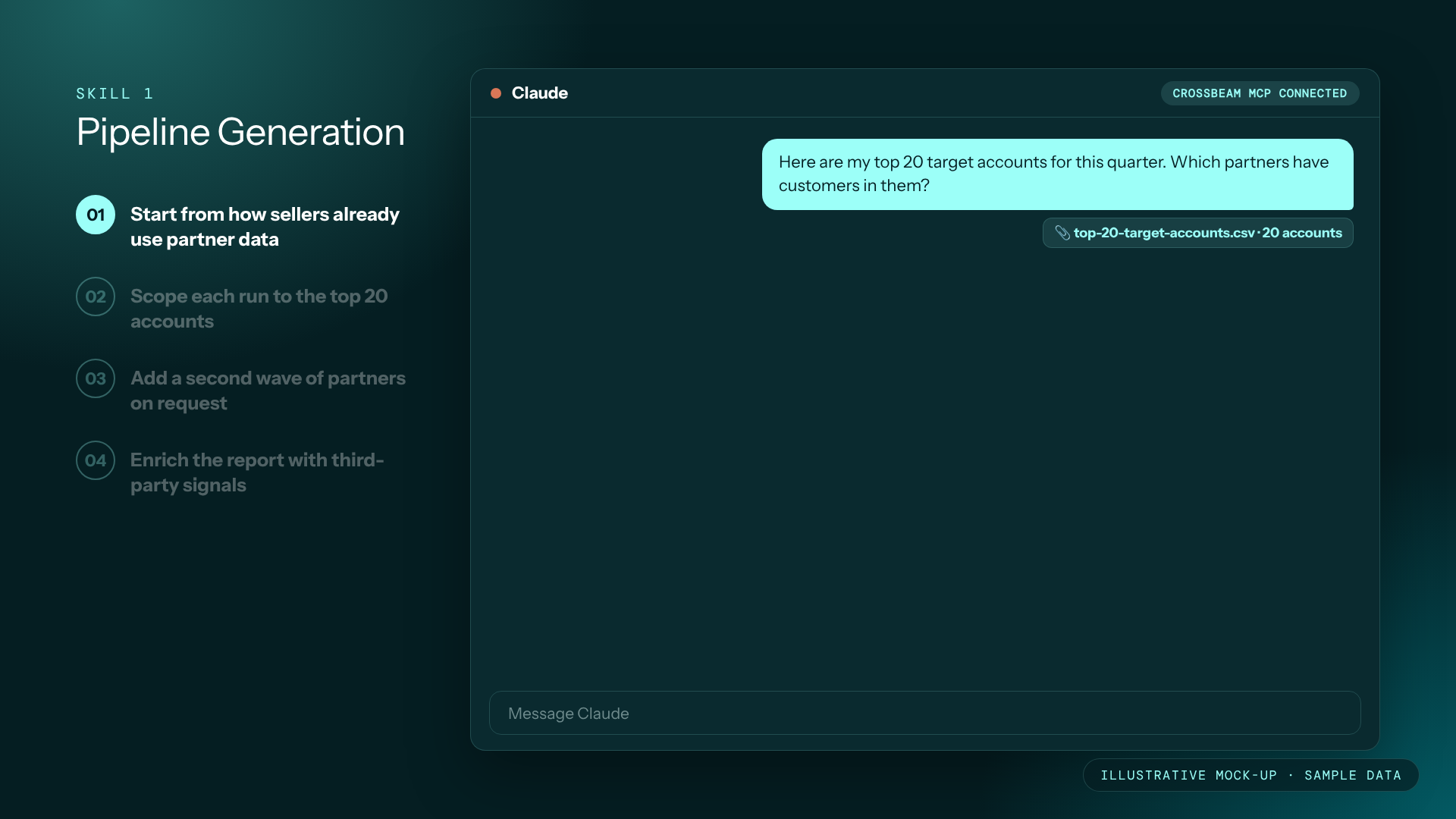
02 Scope each run to the top 20 accounts
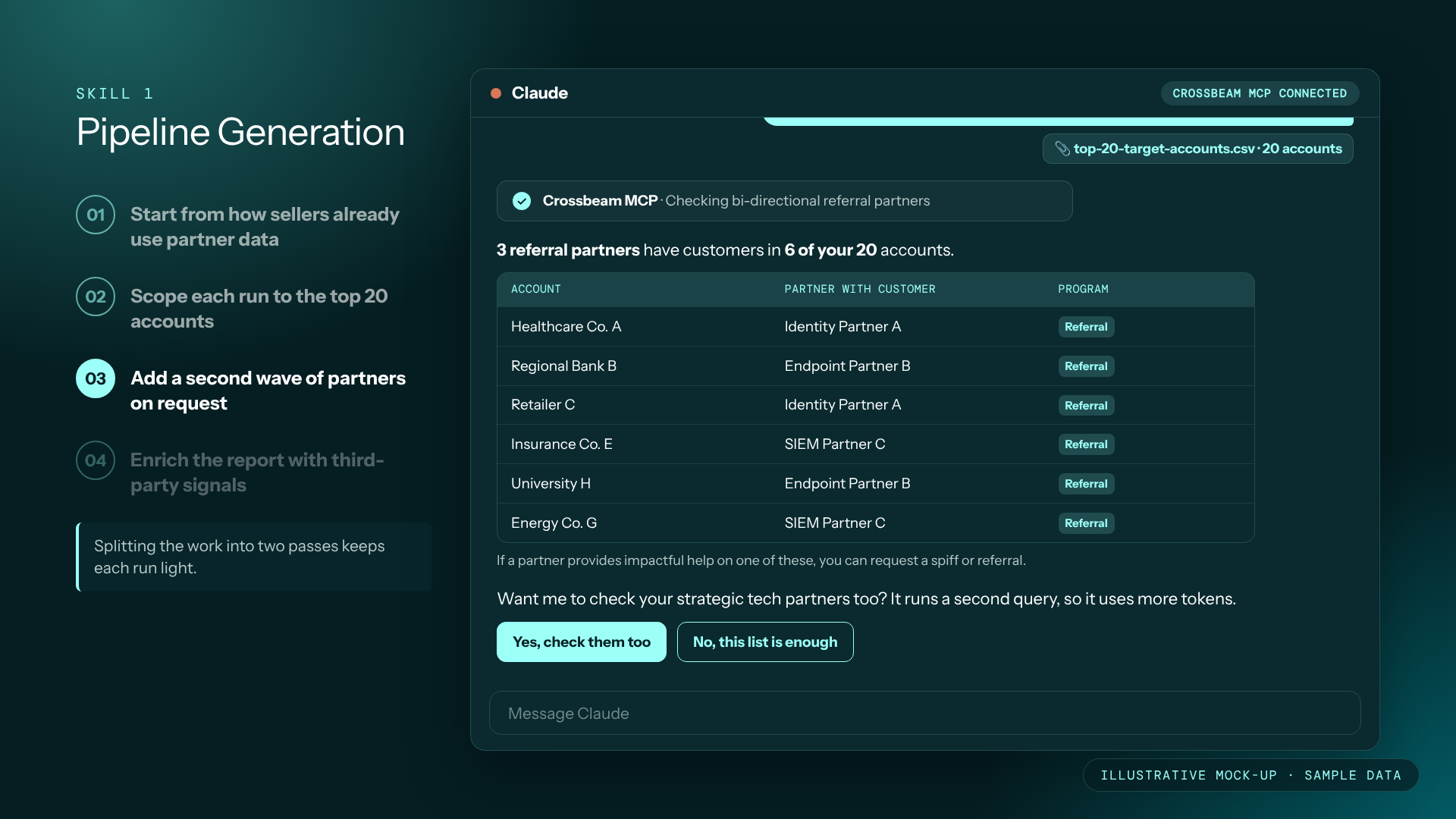
Some reps own hundreds of target accounts, and running them all at once would consume too many tokens. The skill asks each seller for their top 20 target or cold accounts. It runs the first pass only against Netskope's seven or eight most strategic partners, the group in its bidirectional referral program.
Those referral partners also carry a partner tag in Crossbeam, which keeps them visible well beyond the skill.
"Even when a rep is looking at a report or a dashboard that isn't the output of the Claude skill, just seeing that tag pop up next to the partner name reminds them which ones are the priority partners where they can get the most help," Kristen says.
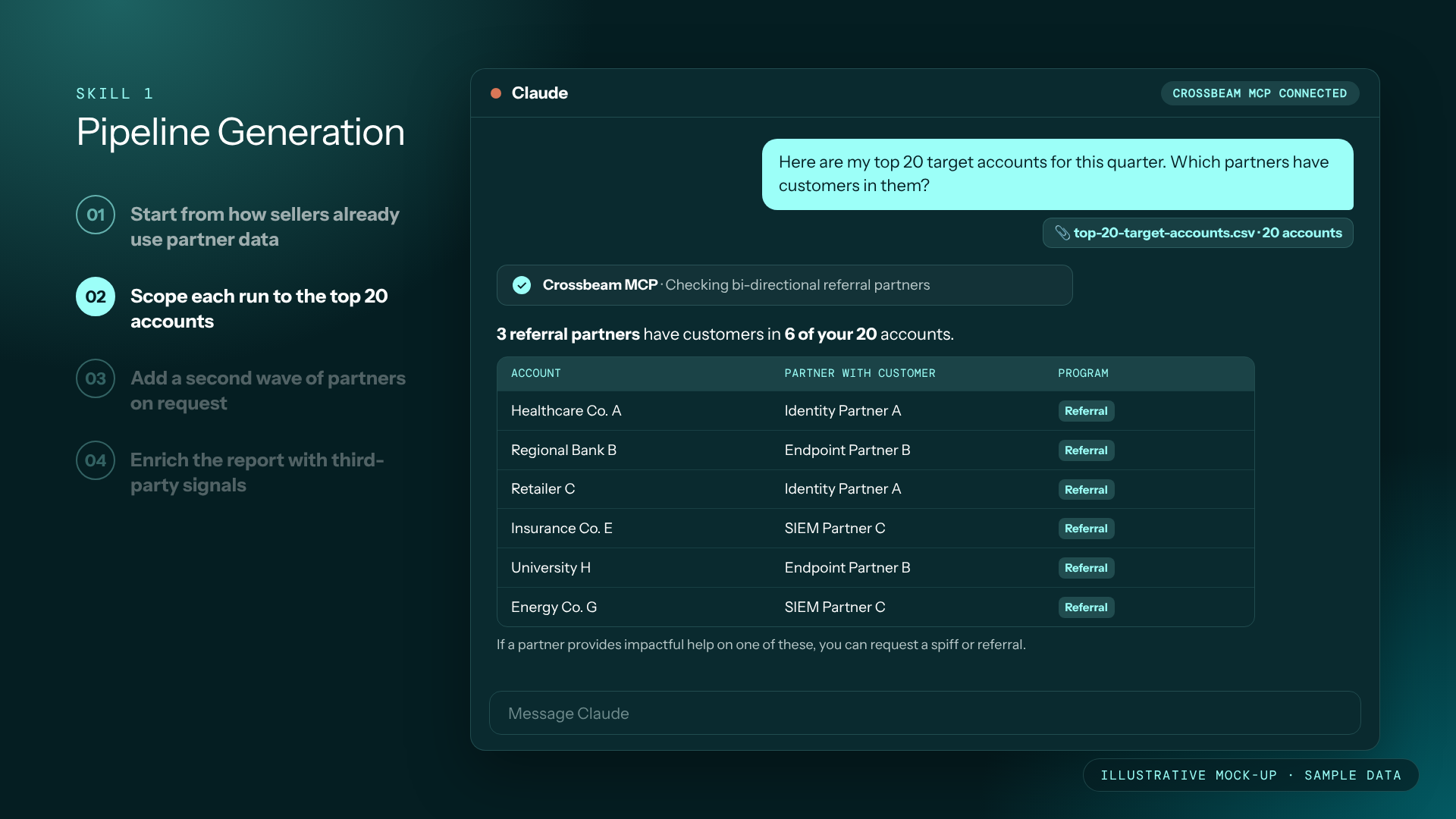
03 Add a second wave of partners on request
After the first results appear, the skill asks whether the seller wants to see more partner overlaps. If they say yes, it runs against a second group of five or six partners. These are partners where Netskope has seen co-sell wins happen naturally, without a formal referral agreement in place. Splitting the work into two passes keeps each run light.
04 Enrich the report with third-party signals
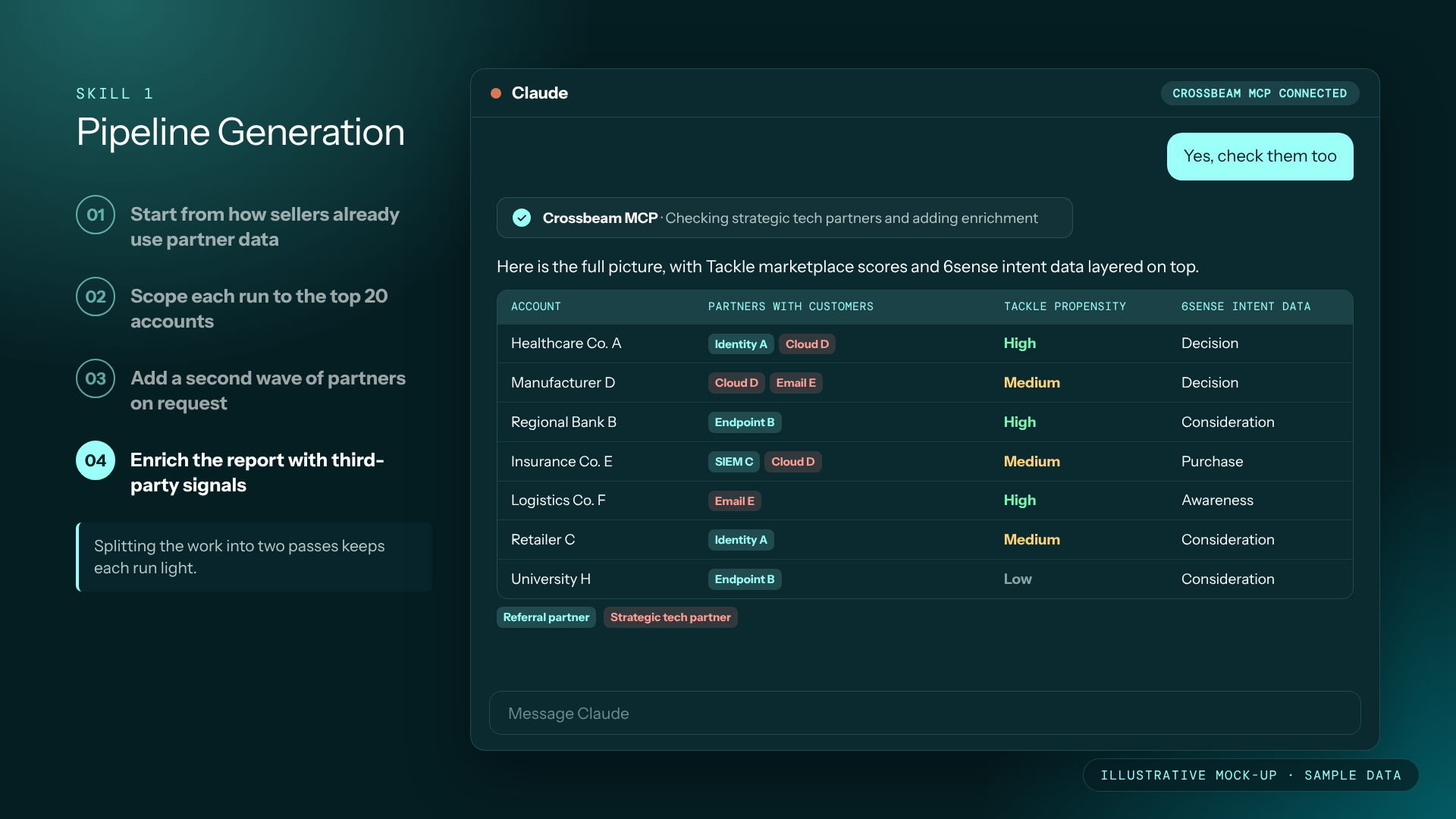
The report pulls the most-used columns from Crossbeam Copilot, then adds intent data from 6sense and cloud marketplace propensity-to-buy scores from Tackle. Sellers can review the results in Claude, export them to a Google Sheet or Excel file, or schedule the report to run every quarter.
"I see more and more connectors in our instance, which makes it easy to pull a full picture for a seller of where they can get help and what could help navigate them when they're trying to make progress in their book of business," Kristen says.
05 Reuse the structure for the channel team
With the pipeline skill working, Kristen made a few changes to create a second skill for offline account mapping. Channel managers can now map a reseller's account list on their own instead of waiting on a ticket in the queue.
%20(1).gif)
What happened: partner help in five minutes or less
The biggest change has been time. A seller who receives the skill, saves it, and runs it for the first time gets a partner-prioritized report on their top accounts in five minutes or less (self-reported). "It was a five-minute thing versus hunting and pecking and figuring out and remembering where to go," Kristen says. "The time savings is the number one benefit."
From there, reps act on their own. Kristen encourages them to send the partner's account owner a short, friendly note, mention that they found the overlap through Crossbeam, and ask for a brief call. For a very large or sensitive account, she may help facilitate the first intro with her alliance peer. Most of the time, the report gives sellers what they need to start co-selling with partners without slowing the deal down.
The sales and marketing teams have seen the most value, and Crossbeam is now a standard part of Netskope's new hire onboarding. "They have to know about the tools available to them, and Crossbeam is definitely one of the top ones," Kristen says. She also credits senior leadership for telling their teams to use the skill. "I don't know if it would have been successful if we hadn't had the leaders making that statement," she says.
A final thought
If you're building a skill like this, expect the first draft to impress you and the polish to take longer. "The first iteration that Claude gave me was really mind-blowing," Kristen says. "I was like, oh my goodness, this is a game changer." Getting it ready for the whole team took several rounds of fine-tuning and early tester feedback, and each round used more Claude credits than she first expected. Build that time and usage into your plan from the start.
Start with the use case that already brings your team the most value, keep each run small, and ask your leaders to back it internally. Once one skill works, the next one can reuse most of its structure, the way Netskope's channel mapping skill grew out of its pipeline skill. That is how Ecosystem-Led Growth scales across a partnerships team and beyond.
Put your partner data where your team already works
Want to give your sellers partner intel on their top accounts in minutes? Book a meeting with our team to learn how the Crossbeam MCP brings your ecosystem data into the AI tools they already use.
This story comes from the webinar "Netskope's AI Playbook for Pipeline Generation for Sellers". Watch the complete interview here.
Frequently asked questions
What does Netskope's pipeline generation skill do?
The skill asks a seller for their top 20 target or cold accounts and checks them against Netskope's most strategic partners through the Crossbeam MCP. It returns where partners can help, such as warm introductions, account history, and common resellers. The report also includes intent data and cloud marketplace propensity scores. Sellers can view it in Claude, export it, or schedule it to run again.
How does Netskope keep Claude usage under control?
The skill limits each run to 20 accounts and starts with only seven or eight strategic partners. A second wave of partners runs only if the seller asks for it. Open-ended queries without a skill had been using up colleagues' monthly credits, so the structured approach keeps costs predictable. Splitting the work into two passes also keeps results easy to read.
How does Netskope decide which partners come first?
The first wave covers partners in Netskope's bidirectional referral program, which has strict entry rules and signed agreements in both directions. Netskope adds partners to that program only after seeing natural co-sell wins driven by customer need. The second wave includes partners where those wins already happen without a formal agreement. Referral partners also carry a tag in Crossbeam so reps can spot them anywhere.
What do sellers do after they get the report?
Sellers reach out to the partner's account owner directly with a short note, mention the Crossbeam overlap, and ask for a brief call. Kristen steps in to help with intros only on very large or sensitive accounts. Because CRM data can go stale when people change roles, a quick first conversation helps confirm the right contact. The goal is to keep deals moving without adding a bottleneck.
Explore features built for

Trade in your spreadsheets and surface the most promising opportunities in your ecosystem with Crossbeam’s pipeline matching engine.

Keep pace with your partner pipeline. Monitor trends with partners and action ecosystem opportunities with a birds eye view into your revenue engine.

Stay up to date on accounts and keep things moving by sending notifications where work happens. Makes moves faster with real-time notifications in Slack and Email.

Connect your partner data anywhere. Get your ecosystem engine going with integrations that fuel your go-to-market teams and business outcomes.