How Clay's Solution Partners team used AI to solve event strategy for Sculpt 2026
- Using Crossbeam MCP and Snowflake to see which of Clay's accounts, ARR, and open pipeline already overlap with each partner's book.
- Tracking event registration and ticket usage.
- Sharing private, partner-specific dashboards.
- Mapping key contacts at shared accounts.



Event strategy for a partner ecosystem is a data problem before it's anything else: who from each partner's book already overlaps with your accounts, who has an open pipeline, and who the right people to invite are. That information usually lives across three different teams and tools, which makes it nearly impossible to plan around.
Tyler Swanson, Head of Solution Partners at Clay, solved it by using AI to pull all of that data into one place.
The problem
Ahead of Sculpt 2026, Clay's annual conference on October 8, Tyler needed to know who from each partner's book was already overlapping with Clay's accounts, who had open pipeline, and who the key contacts were, all without handing over Clay's full attendee list to every partner (that last part mattered).
What he built
Over a weekend, Tyler put together a mutual pipeline dashboard inside Claude Code, in five steps:
- Connect the GTM data layer. He pulled in Snowflake MCP for accounts, ARR, and open opportunities.
- Layer in ecosystem data. Crossbeam MCP added account overlap data, showing where each partner already has traction.
- Map the buying committee. Clay's own MCP found key contacts at each overlapping account and filled any whitespace.
- Add event data. The Zuddl API brought in ticketing and registration data, including how many free and discounted tickets a partner has used and who has already registered.
- Ship it to partners. He pushed the finished dashboard to Lovable, put it behind a password, and gave each partner contact their own private link.
What it shows
The dashboard opens on a summary view: overlap accounts, mutual customers, warm-intro targets, ARR in overlap, open pipeline, and tickets used, all scoped to that one partner.
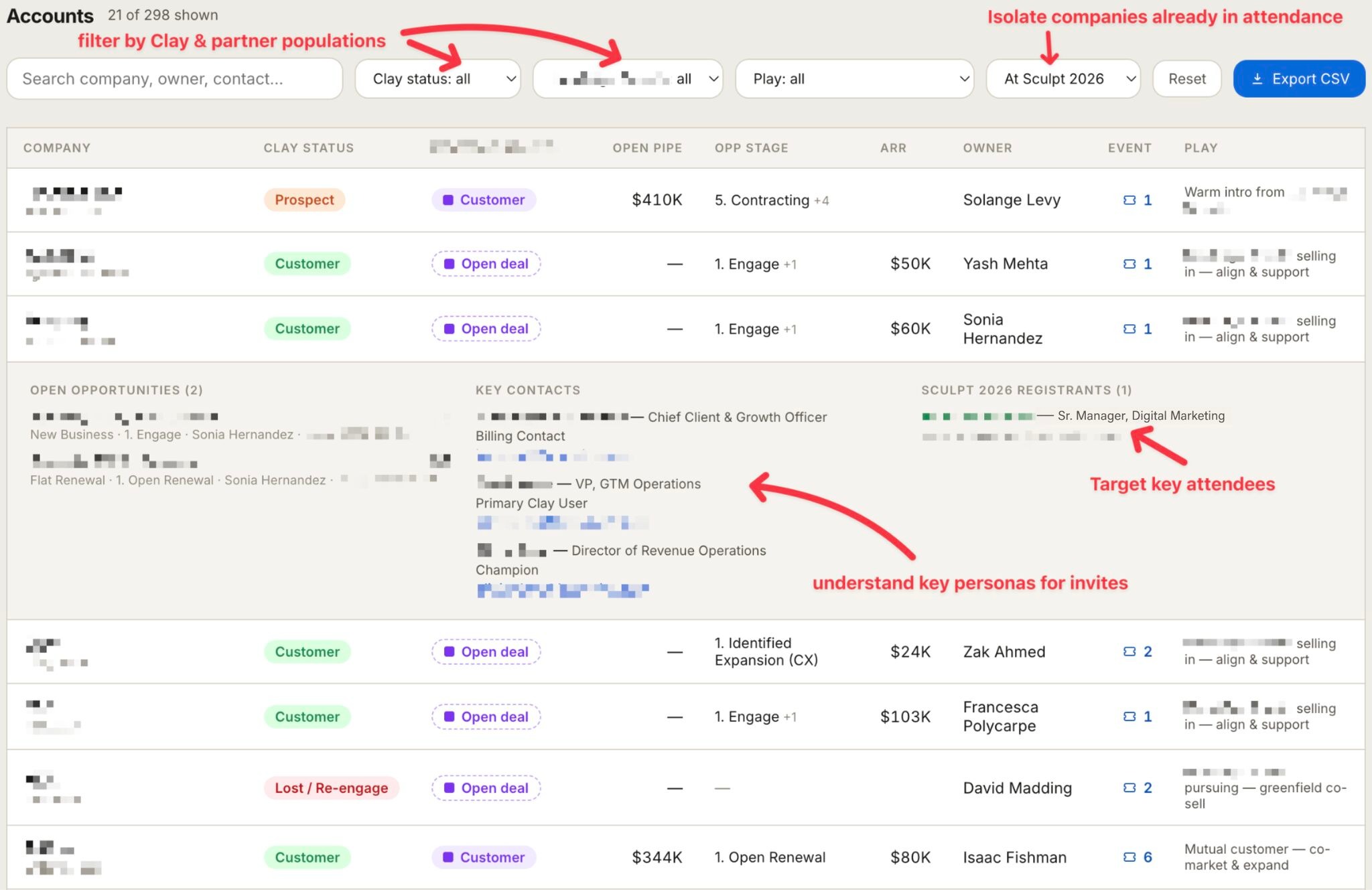
From there, an account table lets a partner filter by Clay status, their own account status, and event attendance, then drill into any row to see open opportunities, key contacts by role, and who from that account is already registered for Sculpt.
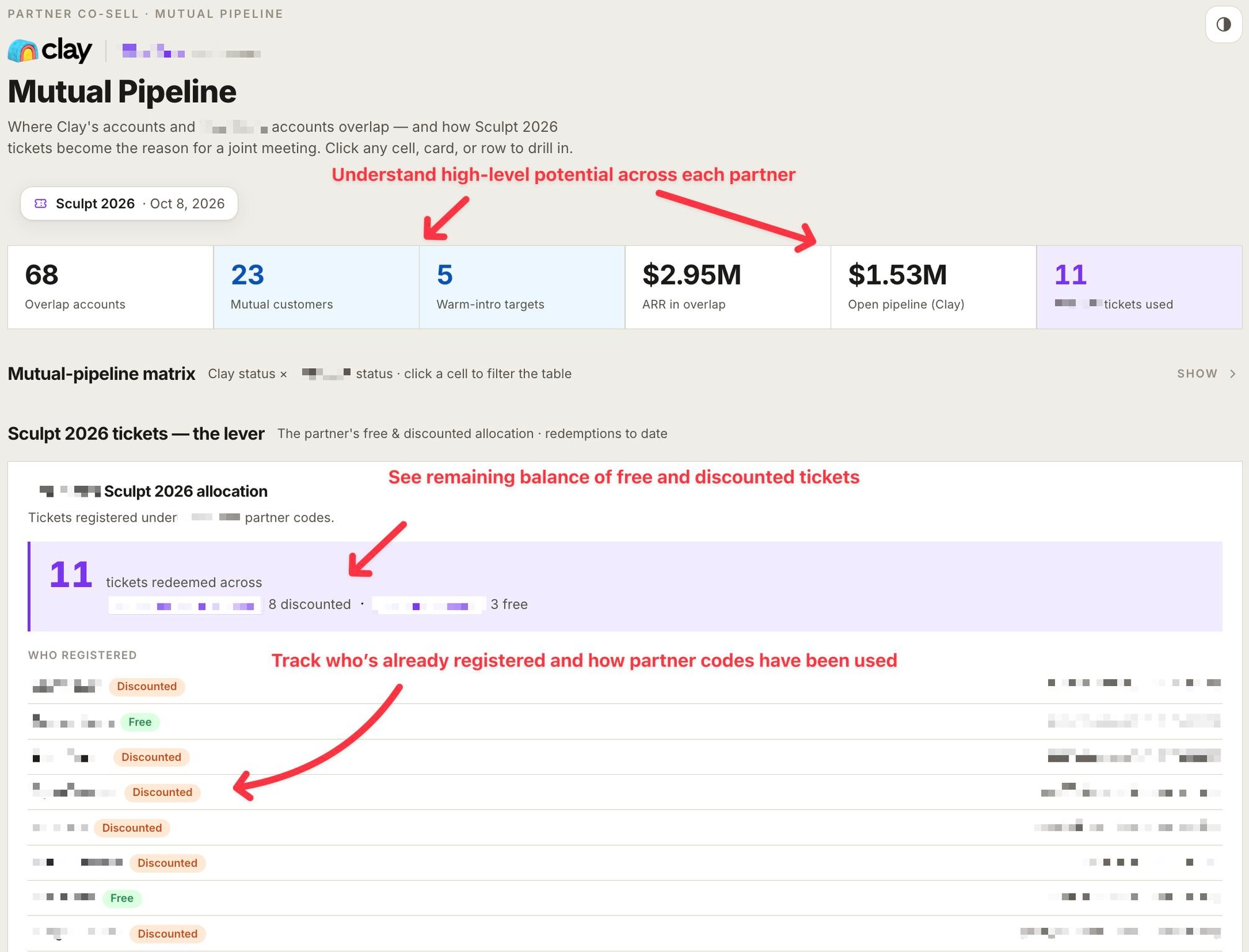
This dashboard helps partners answer two key questions: how do we get the right people invited, and how do we plan face time for mutual customers and high-fit prospects once they're there.
Partner feedback so far backs that up. Since rolling it out, partners have been actively using the dashboard and responding well to having their own Sculpt data in one place. Sculpt itself hasn't happened yet, so there are no tangible results to report, but teams at GoNimbly and demandDrive have already given positive feedback, a good early signal for a dashboard built in a weekend.
Why it matters for ecosystem teams
The build is a good example of what ecosystem-led growth (ELG) looks like when AI tooling is stitched directly into the workflow. Instead of leaving that data scattered, Tyler pulled it into one partner-facing view.
The result: a generic invite list becomes targeted, and a partner call becomes a working session instead of a status update.
If you want to learn more about connecting our MCP with other tools to run event and partner strategy like this, book a meeting with our team.
Explore features built for

Trade in your spreadsheets and surface the most promising opportunities in your ecosystem with Crossbeam’s pipeline matching engine.

Keep pace with your partner pipeline. Monitor trends with partners and action ecosystem opportunities with a birds eye view into your revenue engine.

Stay up to date on accounts and keep things moving by sending notifications where work happens. Makes moves faster with real-time notifications in Slack and Email.

Connect your partner data anywhere. Get your ecosystem engine going with integrations that fuel your go-to-market teams and business outcomes.