How Webflow uses the Crossbeam MCP in Claude to prioritize agency co-selling opportunities
- 90-day sprint planning
- Partner manager deal alerts
- AE-led account mapping
- Intent and product usage enrichment
- Agency co-selling



Webflow is a marketing web platform for mid-market and enterprise brands. Its partnerships team works with full-service digital agencies that build websites and run demand generation, conversion optimization, and AEO for their clients.
Mike Parker, Senior Manager, Partnerships, leads the Americas team. His eight partner managers each own 10 to 12 key accounts and up to 30 partners in their book.
Once Webflow got access to the Crossbeam MCP, Mike's team built a Crossbeam skill in Claude that combines partner overlaps with Webflow's own product usage and intent data.
The team runs that skill three ways: to prep 90-day sprints with a single agency, to flag accounts heating up across a partner manager's book, and to give AEs their own view of agency coverage.
Today, a partner manager can turn a multi-hour account review into a prioritized list in about two minutes.
The problem: too many overlaps and no clear place to start
Crossbeam gave Webflow's partner managers visibility into the accounts they shared with each agency. Large agencies bring long client and prospect lists, though, and the overlaps quickly piled up.
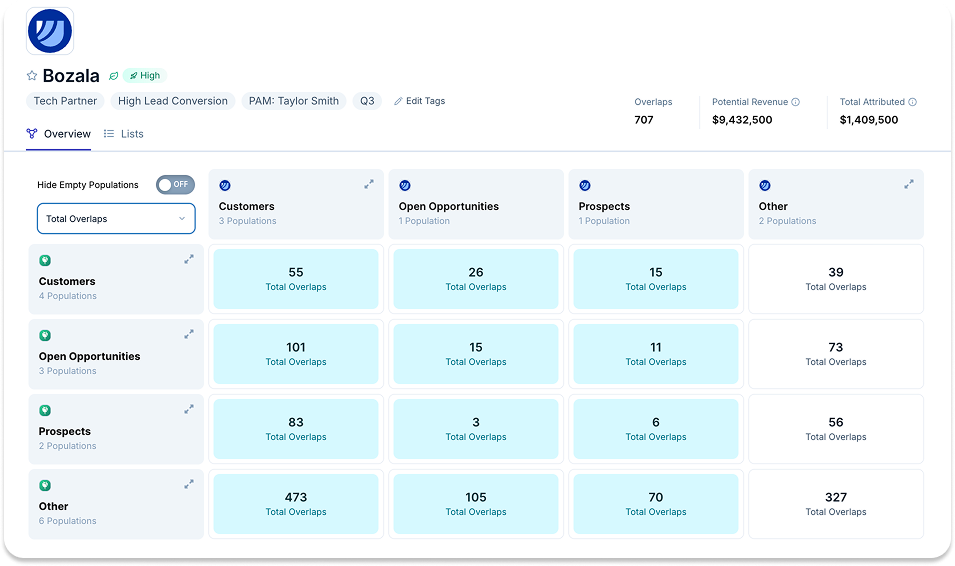
"Crossbeam is a really wonderful tool, and the UI is wonderful even without the MCP. But if you have 100 overlaps, you then have to go start manually digging to find what you're looking for," Mike says. "Now we are seeing great value both in Crossbeam and as we're using the MCP."
To find the accounts actually in a buying cycle, partner managers dug through each overlap by hand. They cross-checked account mapping results against intent and product usage data stored in other systems.
That manual work added hours to the prep for every 90-day sprint, the shorter, more informal format Webflow uses in place of a QBR. Accounts that heated up between sprints could also go unnoticed until the next planning cycle.
How they built it: one Crossbeam skill with three views
Webflow's partner managers work from PAM HQ, a centralized Claude repo built for the partnerships team. Once the Crossbeam MCP was live, the team added a Crossbeam skill to PAM HQ and designed it so different people could run it for different jobs.
01 Layer first-party signals on top of partner overlaps
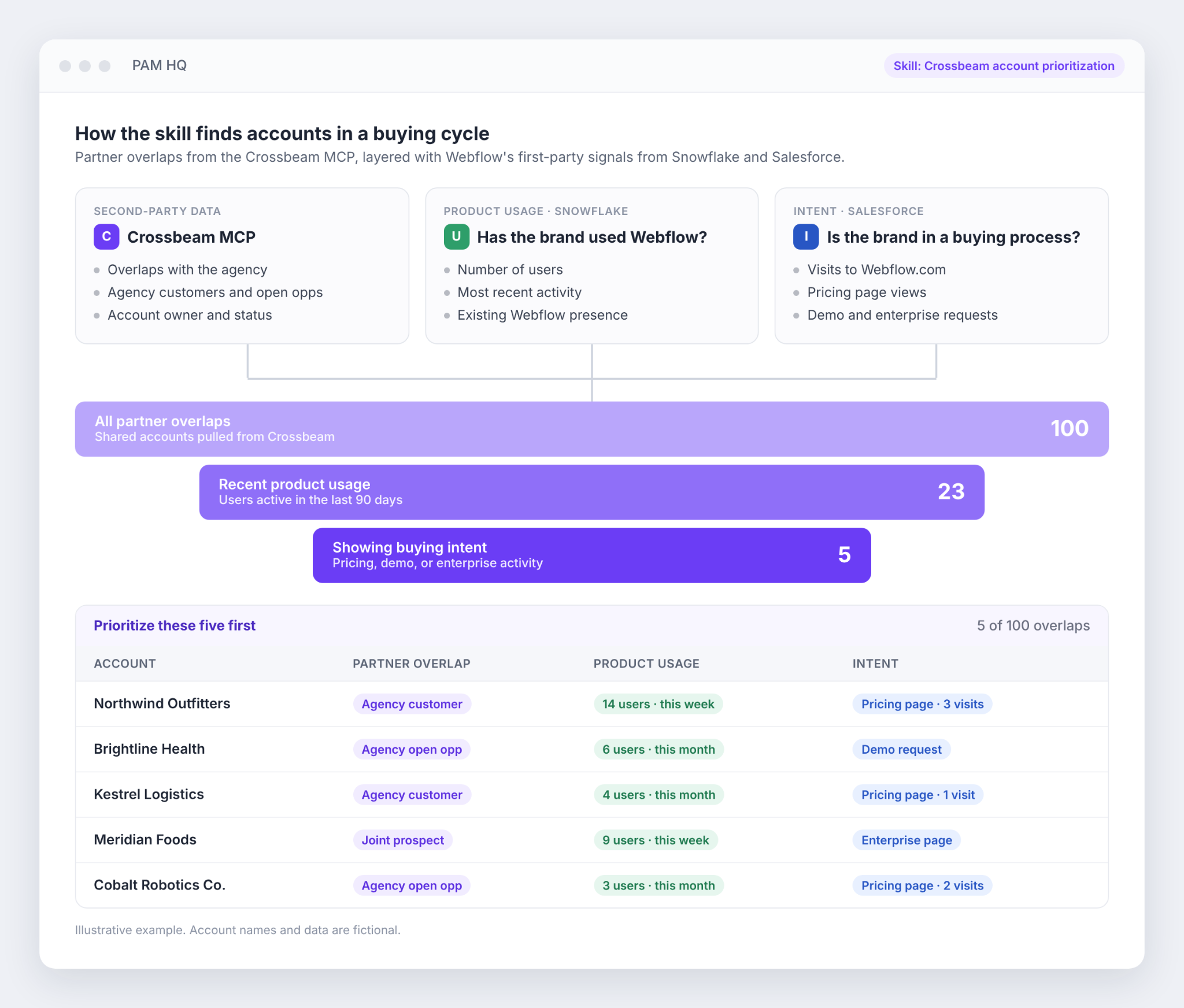
The skill pulls overlap data from Crossbeam through the MCP. It then adds two signals Webflow centralizes in Snowflake and Salesforce:
- Product usage: whether a brand has used Webflow, how many users it has, and how recently they were active
- Intent: whether the brand is visiting Webflow.com, checking pricing, or showing other signs of a buying process
"The combination of product usage and intent data is really allowing us to get granular with our account mapping," Mike says. "By using the MCP, we're able to pull in product usage data to say, of these, call it 100 accounts, these five look like they are in a buying cycle, and we should go and prioritize these five first."
02 Prep each 90-day sprint with an agency deep dive
Before a sprint, a partner manager runs the skill for one agency. It returns three lists:
- Agency customers or open opportunities that are Webflow prospects, for partner-sourced deals
- Webflow customers that are prospects or opportunities for the agency, so the team can broker intros through the CSM or AE
- Joint prospects that meet a tier-one, high-revenue threshold
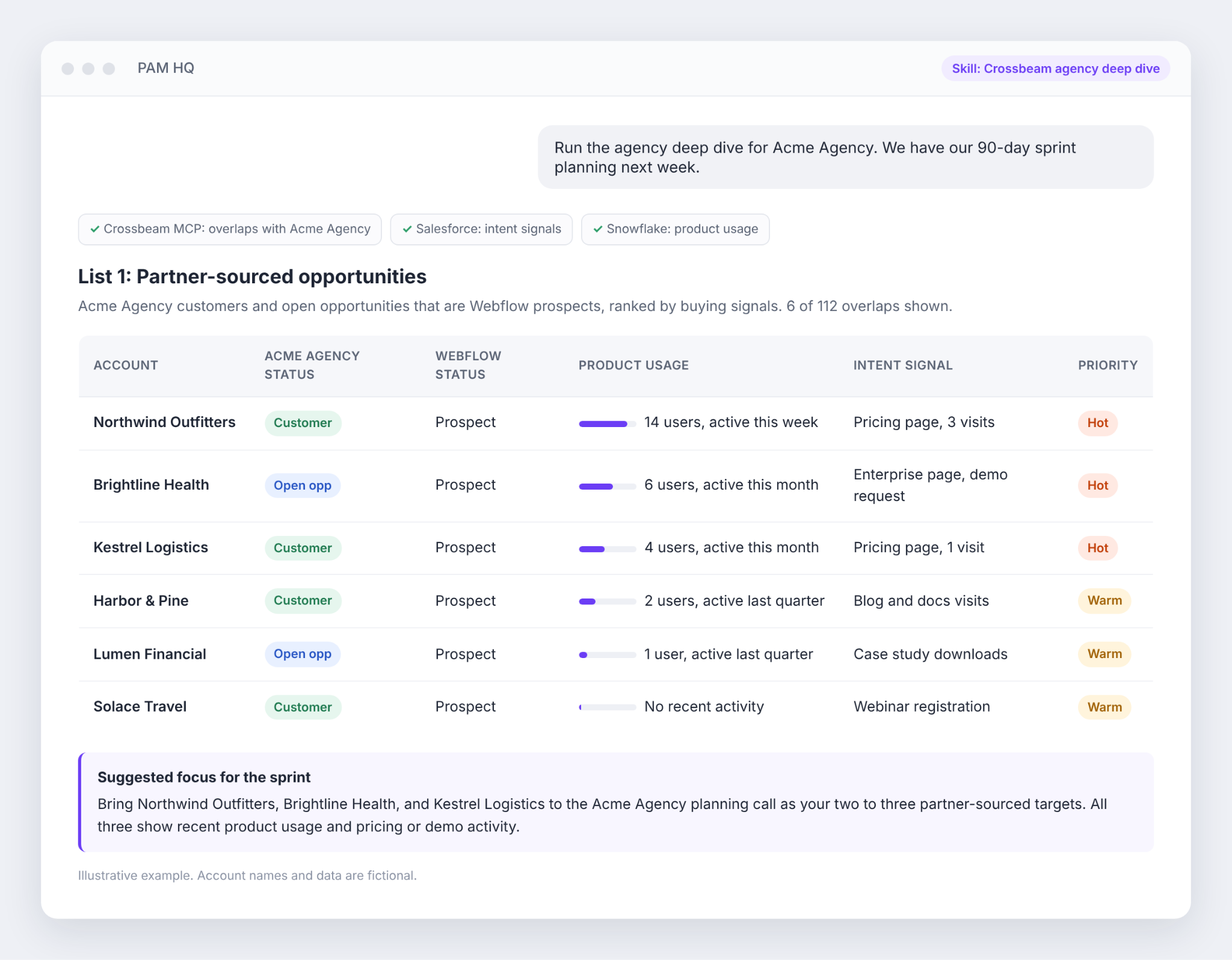
Both sides leave with a shared plan: two to three sourced opportunities, two to three introductions, and two to three dream mutual prospects to co-sell together.

03 Flag accounts that heat up between sprints
The second view runs across every account in a partner manager's Crossbeam book. It flags prospects that have moved into high intent or become tier-one accounts since the sprint was set.
Partner managers use it like a notification feed. They go back to an agency mid-sprint when a prospect is warming up, or ask an agency to broker an intro into an account an AE is already working on.

04 Give AEs their own view of agency coverage
The third view is built for account executives and sales managers with a Crossbeam sales seat. They run their tier-one and tier-two accounts through the skill to see whether a mapped agency is the agency of record, has an open opportunity, or could prospect into the account jointly.

When an agency shows up, the AE loops in the partner manager to broker the conversation. "It gives sales the ability to run their own account mapping independently, but then still lean on the partner manager and the partner to give us some good intel," Mike says.
What happened: hours of prep down to about two minutes
The biggest change has been time. "It's saving hours per partner. It's taking a multi-hour process down to two minutes," Mike says.
Mike measures ROI on both revenue and time. On revenue, he says Webflow is seeing great value from account mapping through Crossbeam and the MCP. On time, the skill gives back hours every sprint. "That allows the partner managers to spend more time on human activities: building the partnership, building trust, and working cross-functionally to really drive the value of the partnerships team," he says.
The workflows have also pulled partnerships closer to the rest of the go-to-market team. RevOps, which runs its own AI go-to-market motion, gave the team positive feedback on the skill.
AEs and sales managers now review their accounts in Claude through the MCP and lean on partner managers to bring agencies into deals. "It is definitely allowing us to get more entrenched with cross-functional partners," Mike says.
A final thought
If you're building a skill like this, ship the first version and plan to keep improving it. Mike describes his approach as "right for right now." His team learned as they built and has refined the skill ever since. "AI is accelerating things so much right now that if you're on the back foot, you're going to fall behind," he says.
"What our skill looks like today is not what our skill is going to look like in a month or a quarter," Mike adds. "You just have to move fast, make mistakes, and keep learning. Fast feet."
Start with the meeting your partner managers spend the most time preparing for. Connect the signals your team already trusts, then build a separate view for each group that will use it. That is how Ecosystem-Led Growth spreads from the partnerships team to sales and RevOps.
Put your partner data where your team already works
Want to help your partner managers find the agency deals worth working first? Book a meeting with our team to learn how the Crossbeam MCP brings your ecosystem data into Claude, ChatGPT, Glean, and the other AI tools your team already uses.
Frequently asked questions
What does Webflow's Crossbeam skill do?
The skill pulls partner overlaps from Crossbeam through the MCP and ranks them using Webflow's product usage and intent data. Partner managers run it for one agency before each 90-day sprint, or across their whole book to catch accounts that are heating up. AEs run it on their tier-one and tier-two accounts to see which agencies can help.
What data does Webflow combine with Crossbeam overlaps?
Webflow adds product usage data, such as how many users a brand has and how recently they were active, plus intent data such as visits to Webflow.com and its pricing page. Both are centralized in Snowflake and Salesforce, then pulled into Claude next to the Crossbeam data.
How does Webflow bring agencies without a CRM into Crossbeam?
Many independent agencies run their business from spreadsheets. Webflow first checks whether an agency serves mid-market and enterprise brands and wants to grow. Agencies that fit are usually happy to upload a Google Sheet as an offline partner in Crossbeam and keep it current once they see account mapping as a joint go-to-market motion.
What happens when several agencies map to the same account?
Most mid-market and enterprise brands work with several agencies. Webflow looks for the agency of record that influences the website or CMS decision, and agencies in Crossbeam are quick to say whether they have that influence. For deal registrations, Webflow's current rules of engagement give the opportunity to the first agency to register it.
This story comes from the webinar "How Webflow Uses AI to Find the Right Agency Signal," part of the MCP Ecosystem Playbook Webinar Series. Watch the complete interview here.
Explore features built for

Trade in your spreadsheets and surface the most promising opportunities in your ecosystem with Crossbeam’s pipeline matching engine.

Keep pace with your partner pipeline. Monitor trends with partners and action ecosystem opportunities with a birds eye view into your revenue engine.

Stay up to date on accounts and keep things moving by sending notifications where work happens. Makes moves faster with real-time notifications in Slack and Email.

Connect your partner data anywhere. Get your ecosystem engine going with integrations that fuel your go-to-market teams and business outcomes.